Convert from Legacy BIOS to EUFI
I wanted to convert the rest of my VMs to use EUFI on proxmox. Here are the steps I followed.
Create a dedicated /boot/efi partition
I had two machines and they had different partition schemas.
Shrinking / with LVM
The first machine looked like this:
> sudo fdisk -l /dev/sda
Disk /dev/sda: 50 GiB, 53687091200 bytes, 104857600 sectors
Disk model: QEMU HARDDISK
Units: sectors of 1 * 512 = 512 bytes
Sector size (logical/physical): 512 bytes / 512 bytes
I/O size (minimum/optimal): 512 bytes / 512 bytes
Disklabel type: dos
Disk identifier: 0xd5de1da6

Device     Boot   Start       End   Sectors  Size Id Type
/dev/sda1  *       2048    999423    997376  487M 83 Linux
/dev/sda2       1001470 104855551 103854082 49.6G  5 Extended
/dev/sda5       1001472 104855551 103854080 49.6G 8e Linux LVM
And I had the following LVM volumes:
> sudo lvs
  LV     VG    Attr       LSize   Pool Origin Data%  Meta%  Move Log Cpy%Sync Convert
  root   nd-vg -wi-ao----  48.60g
  swap_1 nd-vg -wi-a----- 904.00m
I rebooted into the SystemRescue ISO and when I tried to shrink the partition with gparted it couldn’t do it since LVM is involved. So I had to do it manually, first let’s resize the file system:
### make sure the fs is healthy before we start
e2fsck -f /dev/nd-vg/root

### change the fs size (-1G)
### (47.6G * 1024 = 48742.4)
resize2fs /dev/nd-vg/root 48742M

### change the LVM volume
lvresize -L 47.6G /dev/nd-vg/root

### delete the swap LVM volume
lvremove /dev/nd-vg/swap_1

### Change the size of the physical volume
pvresize --setphysicalvolumesize 48.5G /dev/sda5
Now let’s update the partition table:
> fdisk /dev/sda

# delete partition 5 and 2
# create partition 2 start default, end sector which is 48.5G

# (48.5 * 1024 *1024 *1024 / 512) = 101711872 (This is 48.5G in sectors)
# 1001472 (start sector) + 101711872 - 1 = 102713343 (this is the end sector)

# create partition 5 start default, end default
# create partition 3 start default, end default

# change type of partition 5 to 8e
# change type of partition 3 to ef
Here is the full output:
[root@sysrescue ~]# fdisk /dev/sda
Welcome to fdisk (util-linux 2.41.1).
Changes will remain in memory only, until you decide to write them.
Be careful before using the write command.
Command (m for help): d
Partition number (1,2,5, default 5):
Partition 5 has been deleted.
Command (m for help): d
Partition number (1,2, default 2):
Partition 2 has been deleted.
Command (m for help): p
Disk /dev/sda: 50 GiB, 53687091200 bytes, 104857600 sectors
Disk model: QEMU HARDDISK
Units: sectors of 1 * 512 = 512 bytes
Sector size (logical/physical): 512 bytes / 512 bytes
I/O size (minimum/optimal): 512 bytes / 512 bytes
Disklabel type: dos
Disk identifier: 0xd5de1da6
Device     Boot Start    End Sectors  Size Id Type
/dev/sda1  *     2048 999423  997376  487M 83 Linux
Command (m for help): n
Partition type
   p   primary (1 primary, 0 extended, 3 free)
   e   extended (container for logical partitions)
Select (default p): e
Partition number (2-4, default 2):
First sector (999424-104857599, default 999424):
Last sector, +/-sectors or +/-size{K,M,G,T,P} (999424-104857599, default 104857599): 102713343
Created a new partition 2 of type 'Extended' and of size 48.5 GiB.
Command (m for help): p
Disk /dev/sda: 50 GiB, 53687091200 bytes, 104857600 sectors
Disk model: QEMU HARDDISK
Units: sectors of 1 * 512 = 512 bytes
Sector size (logical/physical): 512 bytes / 512 bytes
I/O size (minimum/optimal): 512 bytes / 512 bytes
Disklabel type: dos
Disk identifier: 0xd5de1da6
Device     Boot  Start       End   Sectors  Size Id Type
/dev/sda1  *      2048    999423    997376  487M 83 Linux
/dev/sda2       999424 102713343 101713920 48.5G  5 Extended
Command (m for help): n
All space for primary partitions is in use.
Adding logical partition 5
First sector (1001472-102713343, default 1001472):
Last sector, +/-sectors or +/-size{K,M,G,T,P} (1001472-102713343, default 102713343):
Created a new partition 5 of type 'Linux' and of size 48.5 GiB.
Partition #5 contains a LVM2_member signature.
Do you want to remove the signature? [Y]es/[N]o: n
Command (m for help): w
The partition table has been altered.
Calling ioctl() to re-read partition table.
Syncing disks.
[root@sysrescue ~]# pvscan
  PV /dev/sda5   VG nd-vg   lvm2 [<48.50 GiB / 916.00 MiB free]
  Total: 1 [<48.50 GiB] / in use: 1 [<48.50 GiB] / in no VG: 0 [0   ]
Then the partition table looked like this:
> sudo fdisk -l /dev/sda
Disk /dev/sda: 50 GiB, 53687091200 bytes, 104857600 sectors
Disk model: QEMU HARDDISK
Units: sectors of 1 * 512 = 512 bytes
Sector size (logical/physical): 512 bytes / 512 bytes
I/O size (minimum/optimal): 512 bytes / 512 bytes
Disklabel type: dos
Disk identifier: 0xd5de1da6

Device     Boot     Start       End   Sectors  Size Id Type
/dev/sda1  *         2048    999423    997376  487M 83 Linux
/dev/sda2          999424 102713343 101713920 48.5G  5 Extended
/dev/sda3       102713344 104857599   2144256    1G ef EFI (FAT-12/16/32)
/dev/sda5         1001472 102713343 101711872 48.5G 8e Linux LVM

Partition table entries are not in disk order.
I rebooted into the SystemRescue ISO just to make sure the partition table is still good and I can see all my LVM volumes.
Shrinking / without LVM
On the second machine, I had a different layout:
Disk /dev/sda: 50 GiB, 53687091200 bytes, 104857600 sectors
Disk model: QEMU HARDDISK
Units: sectors of 1 * 512 = 512 bytes
Sector size (logical/physical): 512 bytes / 512 bytes
I/O size (minimum/optimal): 512 bytes / 512 bytes
Disklabel type: dos
Disk identifier: 0x574e1253

Device     Boot     Start       End   Sectors  Size Id Type
/dev/sda1  *         2048 102856703 102854656   49G 83 Linux
/dev/sda2       102858750 104855551   1996802  975M  5 Extended
/dev/sda5       102858752 104855551   1996800  975M 82 Linux swap / Solaris
I booted into the SystemRescue ISO and used gparted to resize the root partition and to create the FAT32 partition:
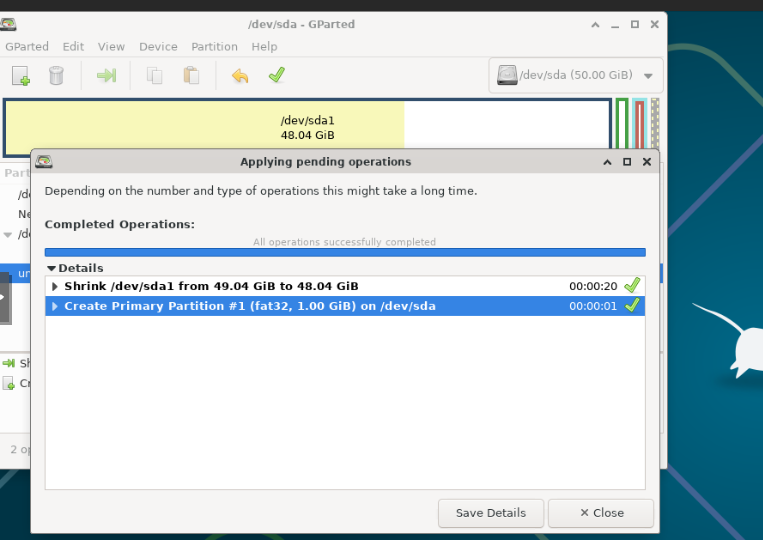
After I rebooted the partition table look like this:
> sudo fdisk -l
Disk /dev/sda: 50 GiB, 53687091200 bytes, 104857600 sectors
Disk model: QEMU HARDDISK
Units: sectors of 1 * 512 = 512 bytes
Sector size (logical/physical): 512 bytes / 512 bytes
I/O size (minimum/optimal): 512 bytes / 512 bytes
Disklabel type: dos
Disk identifier: 0x574e1253

Device     Boot     Start       End   Sectors  Size Id Type
/dev/sda1  *         2048 100759551 100757504   48G 83 Linux
/dev/sda2       102858750 104855551   1996802  975M  5 Extended
/dev/sda3       100759552 102856703   2097152    1G ef EFI (FAT-12/16/32)
/dev/sda5       102858752 104855551   1996800  975M 82 Linux swap / Solaris

Partition table entries are not in disk order.
Create the ESP partition
After the partition is ready, we can format it with a FAT 32 file system. Since both machines created /dev/sda3 as the /boot/efi partition, the same steps apply to both:
mkfs.vfat -F 32 /dev/sda3
Get the uuid of the partition:
> sudo blkid | grep EFI
/dev/sda3: UUID="145D-AD0B" BLOCK_SIZE="512" TYPE="vfat" PARTLABEL="EFI system partition" PARTUUID="50b9b8bd-deb5-4683-9dbf-c0ef247d21df"
And add it to the /etc/fstab file:
> grep efi /etc/fstab
UUID="145D-AD0B" /boot/efi vfat defaults 0 1
Change BIOS Type to EFI in proxmox
The steps are laid out in BIOS and UEFI, there are two:
-
Change BIOS type to EUFI
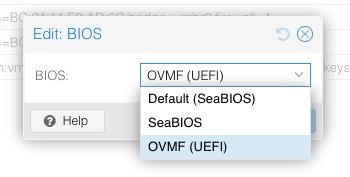
It will give a warning about creating an
EFI Disk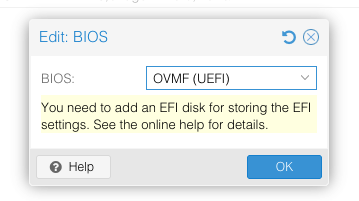
-
Add an EFI disk
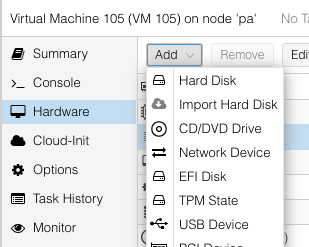
Then choose a storage location to save the disk and you should be set:
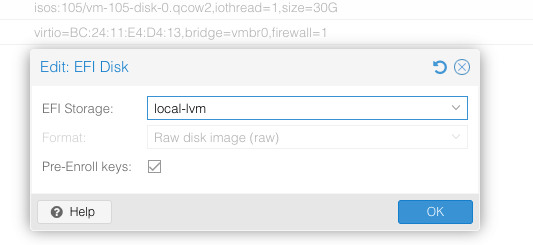
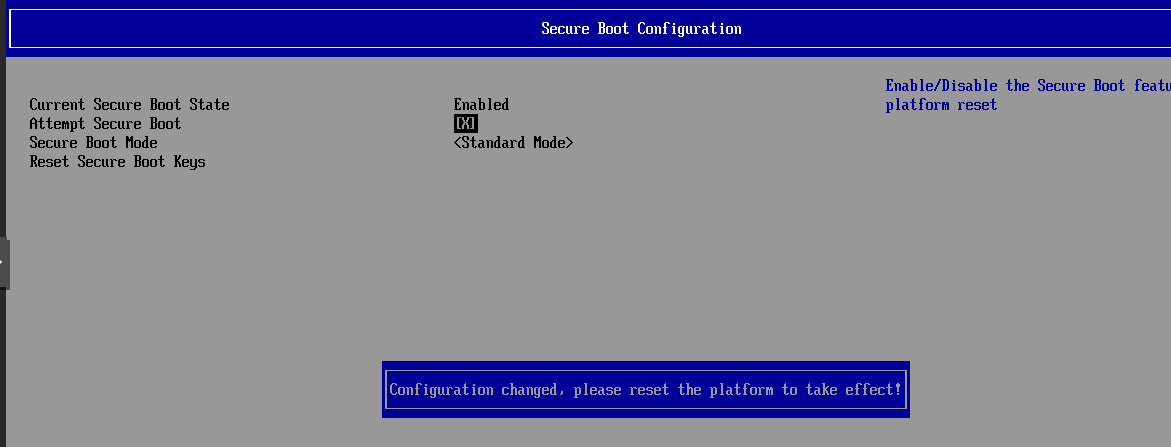
I also had to disable Secure Boot else SystemRescue failed to boot. To disable Secure boot during boot hit F2, then navigate to Device Manager -> Secure Boot Configuration -> Attempt Secure Boot is unchecked:
Convert DOS partition table to GPT partition table
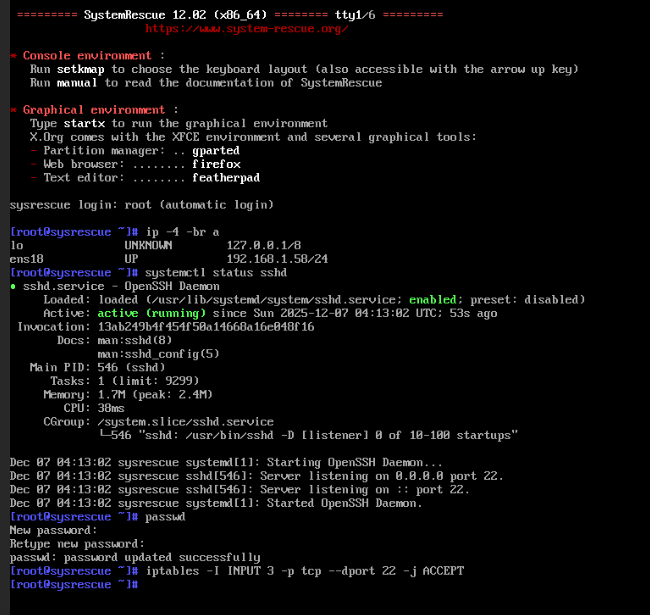
I rebooted into SystemRescue one more time and made sure I can ssh to it:
On the first machine (with LVM), when I tried to run gdisk (it gave me a warning: Warning! Secondary partition table overlaps the last partition by
33 blocks!):
[root@sysrescue ~]# gdisk /dev/sda
GPT fdisk (gdisk) version 1.0.10
Partition table scan:
MBR: MBR only
BSD: not present
APM: not present
GPT: not present
***************************************************************
Found invalid GPT and valid MBR; converting MBR to GPT format
in memory. THIS OPERATION IS POTENTIALLY DESTRUCTIVE! Exit by
typing 'q' if you don't want to convert your MBR partitions
to GPT format!
***************************************************************
Warning! Secondary partition table overlaps the last partition by
33 blocks!
You will need to delete this partition or resize it in another utility.
Command (? for help): p
Disk /dev/sda: 104857600 sectors, 50.0 GiB
Model: QEMU HARDDISK
Sector size (logical/physical): 512/512 bytes
Disk identifier (GUID): 9ACB550A-B0B9-4467-B6FF-4E9394720916
Partition table holds up to 128 entries
Main partition table begins at sector 2 and ends at sector 33
First usable sector is 34, last usable sector is 104857566
Partitions will be aligned on 2048-sector boundaries
Total free space is 4062 sectors (2.0 MiB)
Number Start (sector) End (sector) Size Code Name
1 2048 999423 487.0 MiB 8300 Linux filesystem
3 102713344 104857599 1.0 GiB EF00 EFI system partition
5 1001472 102713343 48.5 GiB 8E00 Linux LVM
This was the new partition I created (/dev/sda3), so I just deleted the partition and made it smaller by 34 sector:
[root@sysrescue ~]# fdisk /dev/sda

Welcome to fdisk (util-linux 2.41.1).
Changes will remain in memory only, until you decide to write them.
Be careful before using the write command.

This disk is currently in use - repartitioning is probably a bad idea.
It's recommended to umount all file systems, and swapoff all swap
partitions on this disk.


Command (m for help): p

Disk /dev/sda: 50 GiB, 53687091200 bytes, 104857600 sectors
Disk model: QEMU HARDDISK
Units: sectors of 1 * 512 = 512 bytes
Sector size (logical/physical): 512 bytes / 512 bytes
I/O size (minimum/optimal): 512 bytes / 512 bytes
Disklabel type: dos
Disk identifier: 0xd5de1da6

Device     Boot     Start       End   Sectors  Size Id Type
/dev/sda1  *         2048    999423    997376  487M 83 Linux
/dev/sda2          999424 102713343 101713920 48.5G  5 Extended
/dev/sda3       102713344 104857599   2144256    1G ef EFI (FAT-12/16/32)
/dev/sda5         1001472 102713343 101711872 48.5G 8e Linux LVM

Partition table entries are not in disk order.

Command (m for help): d
Partition number (1-3,5, default 5): 3

Partition 3 has been deleted.

Command (m for help): n
Partition type
   p   primary (1 primary, 1 extended, 2 free)
   l   logical (numbered from 5)
Select (default p): p
Partition number (3,4, default 3):
First sector (102713344-104857599, default 102713344):
Last sector, +/-sectors or +/-size{K,M,G,T,P} (102713344-104857599, default 104857599): 104857565

Created a new partition 3 of type 'Linux' and of size 1 GiB.
Partition #3 contains a vfat signature.

Do you want to remove the signature? [Y]es/[N]o: y

The signature will be removed by a write command.

Command (m for help): p
Disk /dev/sda: 50 GiB, 53687091200 bytes, 104857600 sectors
Disk model: QEMU HARDDISK
Units: sectors of 1 * 512 = 512 bytes
Sector size (logical/physical): 512 bytes / 512 bytes
I/O size (minimum/optimal): 512 bytes / 512 bytes
Disklabel type: dos
Disk identifier: 0xd5de1da6

Device     Boot     Start       End   Sectors  Size Id Type
/dev/sda1  *         2048    999423    997376  487M 83 Linux
/dev/sda2          999424 102713343 101713920 48.5G  5 Extended
/dev/sda3       102713344 104857565   2144222    1G 83 Linux
/dev/sda5         1001472 102713343 101711872 48.5G 8e Linux LVM

Filesystem/RAID signature on partition 3 will be wiped.
Partition table entries are not in disk order.

Command (m for help): t
Partition number (1-3,5, default 5): 3
Hex code or alias (type L to list all): ef

Changed type of partition 'Linux' to 'EFI (FAT-12/16/32)'.

Command (m for help): p
Disk /dev/sda: 50 GiB, 53687091200 bytes, 104857600 sectors
Disk model: QEMU HARDDISK
Units: sectors of 1 * 512 = 512 bytes
Sector size (logical/physical): 512 bytes / 512 bytes
I/O size (minimum/optimal): 512 bytes / 512 bytes
Disklabel type: dos
Disk identifier: 0xd5de1da6

Device     Boot     Start       End   Sectors  Size Id Type
/dev/sda1  *         2048    999423    997376  487M 83 Linux
/dev/sda2          999424 102713343 101713920 48.5G  5 Extended
/dev/sda3       102713344 104857565   2144222    1G ef EFI (FAT-12/16/32)
/dev/sda5         1001472 102713343 101711872 48.5G 8e Linux LVM

Filesystem/RAID signature on partition 3 will be wiped.
Partition table entries are not in disk order.

Command (m for help): w
The partition table has been altered.
Syncing disks.
Then I tried again:
[root@sysrescue ~]# gdisk /dev/sda
GPT fdisk (gdisk) version 1.0.10

Partition table scan:
  MBR: MBR only
  BSD: not present
  APM: not present
  GPT: not present


***************************************************************
Found invalid GPT and valid MBR; converting MBR to GPT format
in memory. THIS OPERATION IS POTENTIALLY DESTRUCTIVE! Exit by
typing 'q' if you don't want to convert your MBR partitions
to GPT format!
***************************************************************


Command (? for help): w

Final checks complete. About to write GPT data. THIS WILL OVERWRITE EXISTING
PARTITIONS!!

Do you want to proceed? (Y/N): Y
OK; writing new GUID partition table (GPT) to /dev/sda.
Warning: The kernel is still using the old partition table.
The new table will be used at the next reboot or after you
run partprobe(8) or kpartx(8)
The operation has completed successfully.
I rebooted one more time just to make sure everything is good. Then on the second machine (without LVM) I performed the coversion using gdisk (and it went smoother):
[root@sysrescue ~]# gdisk /dev/sda
GPT fdisk (gdisk) version 1.0.10

Partition table scan:
  MBR: MBR only
  BSD: not present
  APM: not present
  GPT: not present


***************************************************************
Found invalid GPT and valid MBR; converting MBR to GPT format
in memory. THIS OPERATION IS POTENTIALLY DESTRUCTIVE! Exit by
typing 'q' if you don't want to convert your MBR partitions
to GPT format!
***************************************************************


Command (? for help): p
Disk /dev/sda: 104857600 sectors, 50.0 GiB
Model: QEMU HARDDISK
Sector size (logical/physical): 512/512 bytes
Disk identifier (GUID): FF056A3E-35D6-4125-AF3B-69D55D6F3548
Partition table holds up to 128 entries
Main partition table begins at sector 2 and ends at sector 33
First usable sector is 34, last usable sector is 104857566
Partitions will be aligned on 2048-sector boundaries
Total free space is 6077 sectors (3.0 MiB)

Number  Start (sector)    End (sector)  Size       Code  Name
   1            2048       100759551   48.0 GiB    8300  Linux filesystem
   3       100759552       102856703   1024.0 MiB  EF00  EFI system partition
   5       102858752       104855551   975.0 MiB   8200  Linux swap

Command (? for help): w

Final checks complete. About to write GPT data. THIS WILL OVERWRITE EXISTING
PARTITIONS!!

Do you want to proceed? (Y/N): Y
OK; writing new GUID partition table (GPT) to /dev/sda.
The operation has completed successfully.
[root@sysrescue ~]# fdisk -l
Disk /dev/sda: 50 GiB, 53687091200 bytes, 104857600 sectors
Disk model: QEMU HARDDISK
Units: sectors of 1 * 512 = 512 bytes
Sector size (logical/physical): 512 bytes / 512 bytes
I/O size (minimum/optimal): 512 bytes / 512 bytes
Disklabel type: gpt
Disk identifier: FF056A3E-35D6-4125-AF3B-69D55D6F3548

Device         Start       End   Sectors  Size Type
/dev/sda1       2048 100759551 100757504   48G Linux filesystem
/dev/sda3  100759552 102856703   2097152    1G EFI System
/dev/sda5  102858752 104855551   1996800  975M Linux swap
Installing GRUB
On the first machine (with LVM), from the SystemRescue ISO:
[root@sysrescue ~]# mount /dev/nd-vg/root /mnt
[root@sysrescue ~]# mount /dev/sda1 /mnt/boot
[root@sysrescue ~]# mount /dev/sda3 /mnt/boot/efi/
[root@sysrescue ~]# mount --bind /proc /mnt/proc
[root@sysrescue ~]# mount --bind /sys /mnt/sys
[root@sysrescue ~]# mount --bind /dev /mnt/dev
[root@sysrescue ~]# chroot /mnt
root@sysrescue:/# mount -t efivarfs efivarfs /sys/firmware/efi/efivars
root@sysrescue:/# efibootmgr -v
bash: efibootmgr: command not found
root@sysrescue:/# apt install grub-efi efibootmgr
root@sysrescue:/# efibootmgr -v
BootCurrent: 0002
Timeout: 3 seconds
BootOrder: 0002,0003,0000,0001
Boot0000* BootManagerMenuApp	FvVol(7cb8bdc9-f8eb-4f34-aaea-3ee4af6516a1)/FvFile(eec25bdc-67f2-4d95-b1d5-f81b2039d11d)
Boot0001* EFI Firmware Setup	FvVol(7cb8bdc9-f8eb-4f34-aaea-3ee4af6516a1)/FvFile(462caa21-7614-4503-836e-8ab6f4662331)
Boot0002* UEFI QEMU DVD-ROM QM00003 	PciRoot(0x0)/Pci(0x1f,0x2)/Sata(1,65535,0)N.....YM....R,Y.
Boot0003* UEFI QEMU QEMU HARDDISK 	PciRoot(0x0)/Pci(0x1e,0x0)/Pci(0x1,0x0)/Pci(0x5,0x0)/SCSI(0,0)N.....YM....R,Y.
root@sysrescue:/# ls /boot/efi
root@sysrescue:/# grub-install --target=x86_64-efi --efi-directory /boot/efi
Installing for x86_64-efi platform.
Installation finished. No error reported.
root@sysrescue:/# ls /boot/efi/EFI/debian/
BOOTX64.CSV  fbx64.efi	grub.cfg  grubx64.efi  mmx64.efi  shimx64.efi
root@sysrescue:/# exit
exit
[root@sysrescue ~]# umount -R /mnt
[root@sysrescue ~]# poweroff
On the second machine (without LVM), from the SystemRescue ISO:
[root@sysrescue ~]# mount /dev/sda1 /mnt
[root@sysrescue ~]# mount /dev/sda3 /mnt/boot/efi/
[root@sysrescue ~]# mount --bind /proc /mnt/proc
[root@sysrescue ~]# mount --bind /sys /mnt/sys
[root@sysrescue ~]# mount --bind /dev /mnt/dev
[root@sysrescue ~]# chroot /mnt
root@sysrescue:/# mount -t efivarfs efivarfs /sys/firmware/efi/efivars
root@sysrescue:/# efibootmgr -v
BootCurrent: 0002
Timeout: 3 seconds
BootOrder: 0002,0003,0000,0001
Boot0000* BootManagerMenuApp  FvVol(7cb8bdc9-f8eb-4f34-aaea-3ee4af6516a1)/FvFile(eec25bdc-67f2-4d95-b1d5-f81b2039d11d)
Boot0001* EFI Firmware Setup  FvVol(7cb8bdc9-f8eb-4f34-aaea-3ee4af6516a1)/FvFile(462caa21-7614-4503-836e-8ab6f4662331)
Boot0002* UEFI QEMU DVD-ROM QM00003   PciRoot(0x0)/Pci(0x1f,0x2)/Sata(1,65535,0)N.....YM....R,Y.
Boot0003* UEFI QEMU QEMU HARDDISK   PciRoot(0x0)/Pci(0x1e,0x0)/Pci(0x4,0x0)/Pci(0x1,0x0)/SCSI(0,0)N.....YM....R,Y.
root@sysrescue:/# grub-install --target=x86_64-efi --efi-directory /boot/efi
Installing for x86_64-efi platform.
Installation finished. No error reported.
root@sysrescue:/# ls /boot/efi/EFI/debian/
BOOTX64.CSV  fbx64.efi  grub.cfg  grubx64.efi  mmx64.efi  shimx64.efi
root@sysrescue:/# exit
exit
[root@sysrescue ~]# umount -R /mnt
[root@sysrescue ~]# poweroff
Readding the swap LVM partition
On the first machine (with LVM), since I deleted and re-added my /boot/efi partition, I updated the /etc/fstab file and updated my initramfs:
root@sysrescue:/# blkid | grep EFI
/dev/sda3: UUID="145D-AD0B" BLOCK_SIZE="512" TYPE="vfat" PARTLABEL="EFI system partition" PARTUUID="50b9b8bd-deb5-4683-9dbf-c0ef247d21df"
root@sysrescue:/# vi /etc/fstab
root@sysrescue:/# update-initramfs -u -k all
update-initramfs: Generating /boot/initrd.img-6.1.0-40-amd64
W: initramfs-tools configuration sets RESUME=/dev/mapper/nd--vg-swap_1
W: but no matching swap device is available.
update-initramfs: Generating /boot/initrd.img-6.1.0-38-amd64
W: initramfs-tools configuration sets RESUME=/dev/mapper/nd--vg-swap_1
W: but no matching swap device is available.
root@sysrescue:/# exit
exit
[root@sysrescue ~]# umount -R /mnt
[root@sysrescue ~]# poweroff
After I rebooted I decided to fix that initramfs warning about missing the swap partition (I deleted that when I creating the new /boot/efi partition):
> sudo vgs
  VG    #PV #LV #SN Attr   VSize   VFree
  nd-vg   1   1   0 wz--n- <48.50g 916.00m
> sudo lvcreate -n swap_1 -l 99%FREE nd-vg
  Logical volume "swap_1" created.
> sudo mkswap /dev/nd-vg/swap_1
Setting up swapspace version 1, size = 904 MiB (947908608 bytes)
no label, UUID=9c2f35a2-d293-4b13-b675-c61119e7562a
Then:
> sudo update-initramfs -u -k all
update-initramfs: Generating /boot/initrd.img-6.1.0-40-amd64
update-initramfs: Generating /boot/initrd.img-6.1.0-38-amd64
And the reboot was faster since it didn’t give a warning about missing the resume partition.