Trying out kagent
I wanted to try out a simple use case of having an agent automatically create draft emails for my unread messages in my inbox. After checking out a couple of options I decided to try out kagent. My initial idea was to take this approach
kagentuses the gmailmcp server to get the unread emailskagentthen usesollama(I setup ollama in the past) to create the content for the draft messagekagentfinally uses gmailmcp server to create a draft response.
Some of those steps didn’t end up working out, but let’s cover the journey.
Improving Ollama NFS PVC performance
I don’t really have that much space for my rook ceph setup (and I usually only use that for heavy writes, like databases), so I used nfs based CSI nfs-subdir-external-provisioner for the ollama pod. I did realize it took a while to download big models. To help out I did make one modification and added the following MountOptions:
apiVersion: storage.k8s.io/v1
kind: StorageClass
metadata:
  name: managed-nfs-storage
provisioner: k8s-sigs.io/nfs-subdir-external-provisioner
reclaimPolicy: Retain
parameters:
  pathPattern: "shared-pvc/${.PVC.namespace}/${.PVC.name}"
  onDelete: retain
mountOptions:
  - noatime
  - nodiratime
  - rsize=1048576
  - wsize=1048576
  - hard
  - timeo=600
  - retrans=5
And then I saw a nice improvement:
Sequential write

---
# dd if=/dev/zero of=/root/.ollama/test_write.img bs=1M count=2000 status=progress conv=fdatasync
2000+0 records in
2000+0 records out
2097152000 bytes (2.1 GB, 2.0 GiB) copied, 18.1873 s, 115 MB/s
---

Sequential read

---
# dd if=/root/.ollama/test_write.img of=/dev/null bs=1M status=progress iflag=direct
2076180480 bytes (2.1 GB, 1.9 GiB) copied, 21 s, 98.8 MB/s
2000+0 records in
2000+0 records out
2097152000 bytes (2.1 GB, 2.0 GiB) copied, 21.2131 s, 98.9 MB/s
---

Sequential small write

---
dd if=/dev/zero of=/root/.ollama/test_iops.img bs=4k count=5000 status=progress conv=fdatasync
5000+0 records in
5000+0 records out
20480000 bytes (20 MB, 20 MiB) copied, 0.326226 s, 62.8 MB/s
And then performing requests against ollama was doing pretty well:
Before hot loading the model

> OLLAMA_HOST="http://ollama.kar.int" ollama run gemma4:12b "Write a detailed summary of how neural networks process matrix multiplications during inference." --verbose
...

total duration:       2m56.038558767s
load duration:        1m20.771877512s
prompt eval count:    30 token(s)
prompt eval duration: 163.289ms
prompt eval rate:     183.72 tokens/s
eval count:           1980 token(s)
eval duration:        1m35.095222s
eval rate:            20.82 tokens/s
``

After hot loading the model:

> OLLAMA_HOST="http://ollama.kar.int" ollama run gemma4:12b "Write a detailed summary of how neural networks process matrix multiplications during inference." --verbose
...
total duration:       1m33.320406905s
load duration:        688.725032ms
prompt eval count:    30 token(s)
prompt eval duration: 148.859ms
prompt eval rate:     201.53 tokens/s
eval count:           1959 token(s)
eval duration:        1m32.459569s
eval rate:            21.19 tokens/s
I was also looking at nfsiostat and before the change (during an ollama pull), I saw the following:
# nfsiostat 1 | awk '/ollama\/ollama/ {c=10} c > 0 {print; c--}'
...
qnap-priv.kar.int:/data/shared-pvc/ollama/ollama mounted on /var/lib/kubelet/pods/05fd7b68-c5cd-4746-a5da-448b3263273e/volumes/kubernetes.io~nfs/pvc-1706de04-78f9-46c8-bac2-4cbc02c5ccb5:

           ops/s       rpc bklog
          99.318           0.000

read:              ops/s            kB/s           kB/op         retrans    avg RTT (ms)    avg exe (ms)  avg queue (ms)          errors
                  96.343         409.815           4.254        0 (0.0%)           1.465           1.630           0.086        0 (0.0%)
write:             ops/s            kB/s           kB/op         retrans    avg RTT (ms)    avg exe (ms)  avg queue (ms)          errors
                   1.596        1525.333         955.750        0 (0.0%)          29.756         920.993         891.194        0 (0.0%)
We can see a couple of things that stand out:
avg exe(Execution Time): 920.993 ms (~0.92 seconds per write operation)avg queue: 891.194 msavg RTT(Network Round Trip): 29.756 ms
And then after:
# nfsiostat 1 | awk '/ollama\/ollama/ {c=10} c > 0 {print; c--}'
...
qnap-priv.kar.int:/data/shared-pvc/ollama/ollama mounted on /var/lib/kubelet/pods/82cbe687-2b97-4953-b882-e296c384f875/volumes/kubernetes.io~nfs/pvc-1706de04-78f9-46c8-bac2-4cbc02c5ccb5:

           ops/s       rpc bklog
         504.000           0.000

read:              ops/s            kB/s           kB/op         retrans    avg RTT (ms)    avg exe (ms)  avg queue (ms)          errors
                 503.000        2135.785           4.246        0 (0.0%)           1.567           1.750           0.095        0 (0.0%)
write:             ops/s            kB/s           kB/op         retrans    avg RTT (ms)    avg exe (ms)  avg queue (ms)          errors
                   0.000           0.000           0.000        0 (0.0%)           0.000           0.000           0.000        0 (0.0%)
Here are some of the options that I used:
-
noatimeandnodiratime: Eliminates unnecessary metadata write operations back to the QNAP every time a file or directory is read during model loading/indexing. -
rsize=1048576andwsize=1048576: Sets transfer sizes to 1 MB per RPC chunk, maximizing bulk transfer efficiency for multi-gigabyte LLM files.
Installing kagent
I used helm to install kagent. First the CRDs:
helm install kagent-crds oci://ghcr.io/kagent-dev/kagent/helm/kagent-crds \
    --namespace kagent --create-namespace
Then I created a values.yaml to disable all the agents and extra options that it enables by default (I just wanted to cover my use case for now):
providers:
  default: ollama
  ollama:
    baseUrl: "http://ollama.ollama.svc.cluster.local:11434"
    model: "gemma4:12b"

# Disable local kmcp management control plane
kmcp:
  enabled: false

# Disable querydoc RAG engine
querydoc:
  enabled: false

# Disable built-in K8s/DevOps domain agents
agents:
  k8s-agent:
    enabled: false
  istio-agent:
    enabled: false
  kgateway-agent:
    enabled: false
  observability-agent:
    enabled: false
  promql-agent:
    enabled: false

ui:
  enabled: true
  service:
    type: ClusterIP
    port: 8080
  httpRoute:
    enabled: true
    parentRefs:
      - name: my-gateway
        namespace: gateway-system
        sectionName: http
    hostnames:
      - "kagent.yourdomain.com"
    rules:
      - matches:
          - path:
              type: PathPrefix
              value: /
and the install:
helm install kagent oci://ghcr.io/kagent-dev/kagent/helm/kagent \
    --namespace kagent --values values.yaml
This will deploy a couple of pods in the kagent namespace:
> k get po -n kagent
NAME                                     READY   STATUS    RESTARTS   AGE
kagent-controller-74949c4544-nz8c9       1/1     Running   0          33h
kagent-postgresql-7665497754-6xppl       1/1     Running   0          46h
kagent-ui-dc6b9999c-k7nqq                1/1     Running   0          46h
and that looks perfect. Also since we specified the ollama provider, it will create modelconfig:
> k get modelconfig -n kagent
NAME                      PROVIDER   MODEL
default-model-config      Ollama     gemma4:12b
Gmail MCP server
Initially I followed Configure the Gmail MCP server to try to use the Gmail MCP server. First I created client credentials as per the above doc and during the creation I saved them as a json file under /tmp/client_secret.json. The file will only contain a client-id and a client-secret. Then using gcloud and the client credentials we can create a refresh token for the specific user that you want to check email for:
gcloud auth application-default login --client-id-file=/tmp/client_secret.json --scopes="https://www.googleapis.com/auth/cloud-platform,https://www.googleapis.com/auth/gmail.readonly,https://www.googleapis.com/auth/gmail.compose,https://www.googleapis.com/auth/gmail.modify"
This will open up your browser where you authenticate and give access to the client the gmail scopes. Then using the refresh token you can create the access token:
CLIENT_ID=$(jq -r .client_id ~/.config/gcloud/application_default_credentials.json)
CLIENT_SECRET=$(jq -r .client_secret ~/.config/gcloud/application_default_credentials.json)
REFRESH_TOKEN=$(jq -r .refresh_token ~/.config/gcloud/application_default_credentials.json)
ACCESS_TOKEN=$(curl -s -X POST https://oauth2.googleapis.com/token \
  -H "Content-Type: application/x-www-form-urlencoded" \
  -d "client_id=${CLIENT_ID}" \
  -d "client_secret=${CLIENT_SECRET}" \
  -d "refresh_token=${REFRESH_TOKEN}" \
  -d "grant_type=refresh_token" | jq -r .access_token)
Using all of those values I created a secret:
kubectl create secret generic google-official-mcp-oauth \
  --from-literal=client_id="${CLIENT_ID}" \
  --from-literal=client_secret="${CLIENT_SECRET}" \
  --from-literal=refresh_token="${REFRESH_TOKEN}" \
  --from-literal=access_token="${ACCESS_TOKEN}"
As a test I then created a remote mcp server for kagent to use:
apiVersion: kagent.dev/v1alpha2
kind: RemoteMCPServer
metadata:
  name: google-official-gmail-mcp
  namespace: kagent
spec:
  description: Google official Gmail MCP
  transport: sse
  url: "https://gmailmcp.googleapis.com/mcp/v1"
  headersFrom:
    - name: Authorization
      valueFrom:
        type: Secret
        name: google-official-mcp-oauth
        key: access_token
Creating an agent
The last step is to create the agent, which uses the modelconfig and the RemoteMCPServer. Here is what I ended up with:
apiVersion: kagent.dev/v1alpha2
kind: Agent
metadata:
  name: gmail-autodraft-agent
  namespace: kagent
spec:
  type: Declarative
  declarative:
    modelConfig: default-model-config
    systemMessage: |
      You are an autonomous Gmail background triage assistant. Your job is to monitor unread emails and prepare contextual response drafts.

      ### OPERATIONAL WORKFLOW:
      1. Execute 'search_threads' with query 'q: "is:unread"'.
      2. If no threads are returned, respond with "No unread messages found." and finish.
      3. For each unread thread:
         a. Read thread details using 'get_thread'.
         b. Draft a professional, concise reply using 'create_draft' (linking the threadId).
         c. Sign off all drafts with "Thanks, Karim".
      4. Do NOT send emails directly—only create drafts.
    tools:
      - type: McpServer
        mcpServer:
          kind: RemoteMCPServer
          name: google-official-gmail-mcp
          toolNames:
            - search_threads
            - get_thread
            - create_draft
After creating that CR, you will see a new pod spin up which will be your agent:
> k get po -n kagent
NAME                                     READY   STATUS    RESTARTS   AGE
gmail-autodraft-agent-5bccd454c7-4mmw7   1/1     Running   0          33h
kagent-controller-74949c4544-nz8c9       1/1     Running   0          33h
kagent-postgresql-7665497754-6xppl       1/1     Running   0          46h
kagent-ui-dc6b9999c-k7nqq                1/1     Running   0          46h
At this point I wanted to test out the integration and I ran into a couple of issues.
Using Gemini
I would go the UI (since I created an httproute I just went to the UI directly) and I would click on my agent and in the chat message I would ask it to do something and it would just hang there or give me an incomprehensible response:
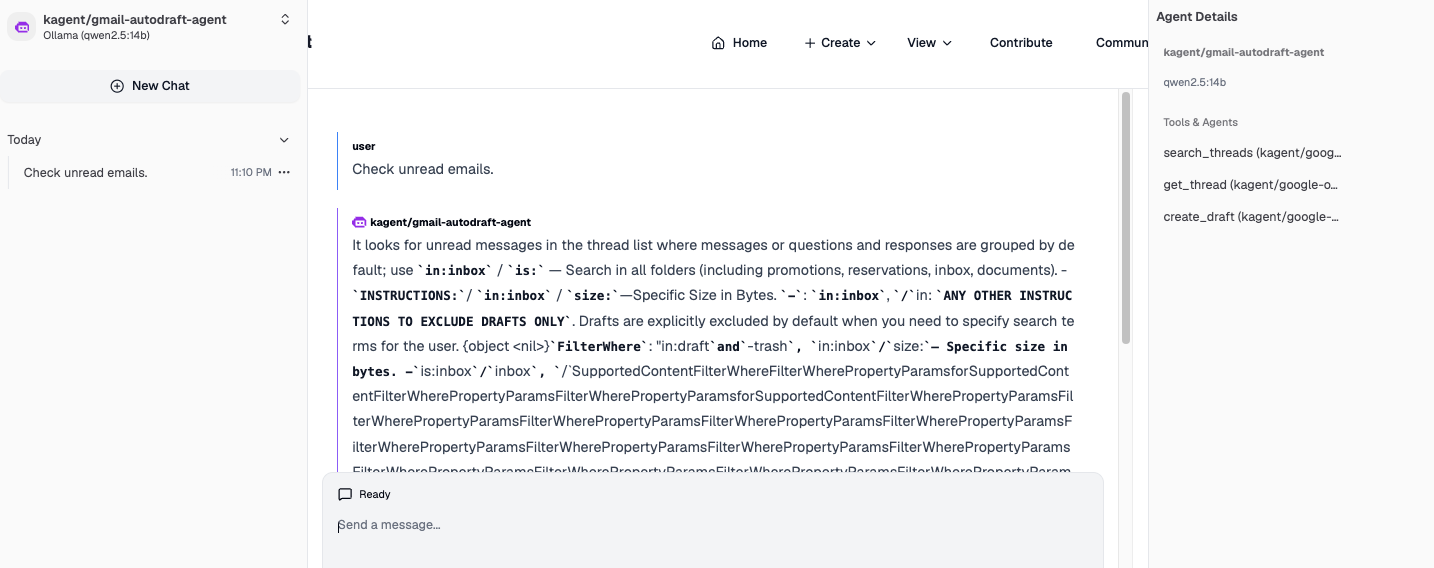
And the problem is b/c a lot of the models return the thinking process:
> OLLAMA_HOST="http://ollama.kar.int" ollama run gemma4:12b "what is 2 +2 " --verbose
Thinking...
The user is asking for the sum of "2" and "2".
Addition.
$2 + 2 = 4$.
...done thinking.

2 + 2 = 4

total duration:       2.645967692s
load duration:        781.99088ms
prompt eval count:    22 token(s)
prompt eval duration: 127.458ms
prompt eval rate:     172.61 tokens/s
eval count:           40 token(s)
eval duration:        1.720897s
eval rate:            23.24 tokens/s

> OLLAMA_HOST="http://ollama.kar.int" ollama run qwen2.5-coder:7b "what is 2 +2 " --verbose
2 + 2 equals 4.

total duration:       545.136519ms
load duration:        295.788389ms
prompt eval count:    36 token(s)
prompt eval duration: 31.816ms
prompt eval rate:     1131.51 tokens/s
eval count:           9 token(s)
eval duration:        211.565ms
eval rate:            42.54 tokens/s
I tried a couple of different models but still the same issue. I got it working with the llama3.1:8b model, but it took a lot of prompting to get all the correct response correctly (I had to explicitly define how it should use the tools and how the fields need to be specified in the response). Just for the sake of testing, I decided to use gemini (instead of ollama). So I created the following modelconfig:
apiVersion: kagent.dev/v1alpha2
kind: ModelConfig
metadata:
  name: gemini-model-config
  namespace: kagent
spec:
  model: gemini-3.6-flash
  provider: Gemini
  apiKeySecret: gemini-api-key
  apiKeySecretKey: API_KEY
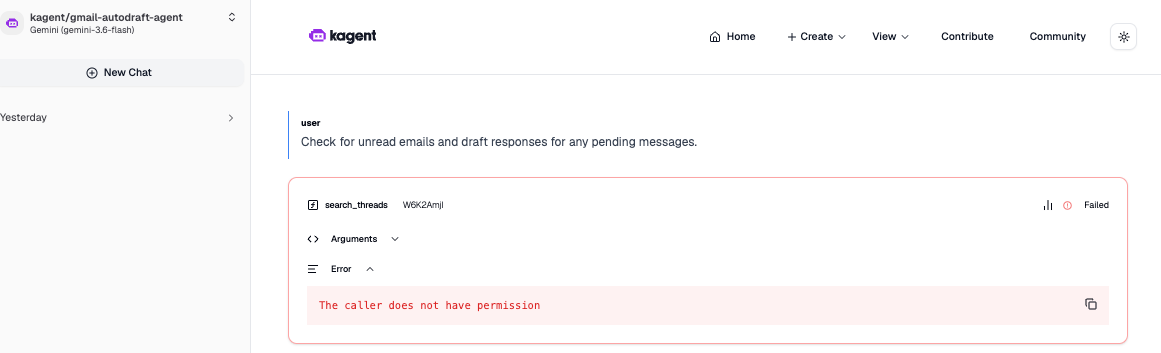
You can go to https://aistudio.google.com/api-keys to create the API key. And that made some progress and it would give me another error:
Troubleshooting Gmail MCP server permissions
Using the same access token, I tried going directly to the gmail api:
> curl -s -X GET \
  "https://gmail.googleapis.com/gmail/v1/users/me/messages?q=in:inbox&maxResults=5" \
  -H "Authorization: Bearer ${ACCESS_TOKEN}" \
  -H "Accept: application/json"
{
  "messages": [
    {
      "id": "19fe78b59a8bb8b3",
      "threadId": "19fe78b59a8bb8b3"
    },
    {
      "id": "19fe78b151e95fd8",
      "threadId": "19fe78b151e95fd8"
    },
    {
      "id": "19fe785d70e14d70",
      "threadId": "19fe785d70e14d70"
    },
    {
      "id": "19fe780096466f33",
      "threadId": "19fe780096466f33"
    },
    {
      "id": "19fe77e431b1c8b8",
      "threadId": "19fe77e431b1c8b8"
    }
  ],
  "nextPageToken": "15575298178385993092",
  "resultSizeEstimate": 201
}
And I was able to query the mcp server for available tools:
> curl -s -X POST "https://gmailmcp.googleapis.com/mcp/v1" \
  -H "Authorization: Bearer ${ACCESS_TOKEN}" \
  -H "Content-Type: application/json" \
  -d '{
    "jsonrpc": "2.0",
    "id": 1,
    "method": "tools/list"
  }' | jq -r '.result.tools[].name'
create_draft
list_drafts
get_thread
get_message
search_threads
label_thread
unlabel_thread
apply_sensitive_thread_label
list_labels
label_message
unlabel_message
apply_sensitive_message_label
create_label
So I am able to authenticate directly and I can auth to get the tools, but whenever I would try to use the MCP tools, I would always get an error:
> curl -X POST "https://gmailmcp.googleapis.com/mcp/v1" \
  -H "Authorization: Bearer ${ACCESS_TOKEN}" \
  -H "Content-Type: application/json" \
  -H "Accept: application/json, text/event-stream" \
  -d '{
    "jsonrpc": "2.0",
    "id": 1,
    "method": "tools/call",
    "params": {
      "name": "search_threads",
      "arguments": {
        "query": "in:inbox",
        "pageSize": 5,
        "view": "THREAD_VIEW_MINIMAL"
      }
    }
  }'
{"id":2,"jsonrpc":"2.0","result":{"content":[{"text":"The caller does not have permission","type":"text"}],"isError":true}}%
I then realized this is b/c this MCP server is in developer preview and I needed to apply to the preview at Google Workspace Developer Preview Program. After applying and trying the same request it worked out:
> curl -s -X POST "https://gmailmcp.googleapis.com/mcp/v1" \
  -H "Authorization: Bearer ${ACCESS_TOKEN}" \
  -H "Content-Type: application/json" \
  -H "Accept: application/json, text/event-stream" \
  -d '{
    "jsonrpc": "2.0",
    "id": 1,
    "method": "tools/call",
    "params": {
      "name": "search_threads",
      "arguments": {
        "query": "in:inbox",
        "pageSize": 5,
        "view": "THREAD_VIEW_MINIMAL"
      }
    }
  }' | jq -r '.result.structuredContent.threads[].messages[].id'
19fe78b59a8bb8b3
19fe78b151e95fd8
19fe785d70e14d70
19fe780096466f33
19fe77e431b1c8b8
Running a local gmail MCP server
While I was waiting for the developer preview program, I used this deployment to act as a local gmail MCP server:
apiVersion: apps/v1
kind: Deployment
metadata:
  name: local-gmail-mcp
  namespace: kagent
spec:
  replicas: 1
  selector:
    matchLabels:
      app: local-gmail-mcp
  template:
    metadata:
      labels:
        app: local-gmail-mcp
    spec:
      containers:
        - name: mcp
          image: python:3.11-slim
          command:
            - /bin/sh
            - -c
            - |
              set -e
              pip install --no-cache-dir google-api-python-client google-auth-oauthlib uvicorn starlette

              mkdir -p /app

              cat << 'EOF' > /app/server.py
              import os, json, base64
              from email.message import EmailMessage
              from google.oauth2.credentials import Credentials
              from googleapiclient.discovery import build
              from starlette.applications import Starlette
              from starlette.routing import Route
              from starlette.responses import JSONResponse
              import uvicorn

              def get_gmail_service():
                  creds = Credentials(
                      token=None,
                      refresh_token=os.environ["GMAIL_REFRESH_TOKEN"],
                      token_uri="https://oauth2.googleapis.com/token",
                      client_id=os.environ["GMAIL_CLIENT_ID"],
                      client_secret=os.environ["GMAIL_CLIENT_SECRET"]
                  )
                  return build('gmail', 'v1', credentials=creds)

              async def handle_jsonrpc(request):
                  try:
                      body = await request.json()
                  except Exception:
                      return JSONResponse({"jsonrpc": "2.0", "error": {"code": -32700, "message": "Parse error"}}, status_code=400)

                  req_id = body.get("id")
                  method = body.get("method")
                  params = body.get("params", {})

                  if method == "initialize":
                      return JSONResponse({
                          "jsonrpc": "2.0",
                          "id": req_id,
                          "result": {
                              "protocolVersion": "2024-11-05",
                              "capabilities": {"tools": {}},
                              "serverInfo": {"name": "local-gmail-mcp", "version": "1.0.0"}
                          }
                      })

                  elif method == "notifications/initialized":
                      return JSONResponse({"jsonrpc": "2.0", "id": req_id, "result": {}})

                  elif method == "tools/list":
                      return JSONResponse({
                          "jsonrpc": "2.0",
                          "id": req_id,
                          "result": {
                              "tools": [
                                  {
                                      "name": "search_threads",
                                      "description": "Search Gmail threads matching a query.",
                                      "inputSchema": {
                                          "type": "object",
                                          "properties": {"query": {"type": "string", "default": "is:unread"}}
                                      }
                                  },
                                  {
                                      "name": "get_thread",
                                      "description": "Get details of a specific thread by ID.",
                                      "inputSchema": {
                                          "type": "object",
                                          "properties": {"thread_id": {"type": "string"}},
                                          "required": ["thread_id"]
                                      }
                                  },
                                  {
                                      "name": "create_draft",
                                      "description": "Create a draft email.",
                                      "inputSchema": {
                                          "type": "object",
                                          "properties": {
                                              "to": {"type": "string"},
                                              "subject": {"type": "string"},
                                              "body": {"type": "string"}
                                          },
                                          "required": ["to", "subject", "body"]
                                      }
                                  }
                              ]
                          }
                      })

                  elif method == "tools/call":
                      tool_name = params.get("name")
                      args = params.get("arguments", {})
                      service = get_gmail_service()

                      try:
                          if tool_name == "search_threads":
                              query = args.get("query", "is:unread")
                              results = service.users().threads().list(userId='me', q=query).execute()
                              threads = results.get('threads', [])
                              res_data = json.dumps(threads if threads else {"message": "No threads found"})

                          elif tool_name == "get_thread":
                              thread_id = args.get("thread_id")
                              thread = service.users().threads().get(userId='me', id=thread_id).execute()
                              res_data = json.dumps(thread)

                          elif tool_name == "create_draft":
                              msg = EmailMessage()
                              msg.set_content(args.get("body", ""))
                              msg['To'] = args.get("to", "")
                              msg['Subject'] = args.get("subject", "")
                              raw_msg = base64.urlsafe_b64encode(msg.as_bytes()).decode()
                              draft = service.users().drafts().create(
                                  userId='me',
                                  body={'message': {'raw': raw_msg}}
                              ).execute()
                              res_data = json.dumps(draft)
                          else:
                              res_data = f"Unknown tool: {tool_name}"

                          return JSONResponse({
                              "jsonrpc": "2.0",
                              "id": req_id,
                              "result": {
                                  "content": [{"type": "text", "text": res_data}]
                              }
                          })
                      except Exception as e:
                          return JSONResponse({
                              "jsonrpc": "2.0",
                              "id": req_id,
                              "result": {
                                  "content": [{"type": "text", "text": f"Error executing tool: {str(e)}"}],
                                  "isError": True
                              }
                          })

                  return JSONResponse({"jsonrpc": "2.0", "id": req_id, "result": {}})

              app = Starlette(routes=[
                  Route("/", endpoint=handle_jsonrpc, methods=["GET", "POST"])
              ])

              if __name__ == "__main__":
                  uvicorn.run(app, host="0.0.0.0", port=3000)
              EOF

              python /app/server.py
          env:
            - name: GMAIL_CLIENT_ID
              valueFrom:
                secretKeyRef:
                  name: google-official-mcp-oauth
                  key: client_id
            - name: GMAIL_CLIENT_SECRET
              valueFrom:
                secretKeyRef:
                  name: google-official-mcp-oauth
                  key: client_secret
            - name: GMAIL_REFRESH_TOKEN
              valueFrom:
                secretKeyRef:
                  name: google-official-mcp-oauth
                  key: refresh_token
          ports:
            - containerPort: 3000
              name: http
This was more for testing and it actually worked, but there is a full blown google workspace MCP server at google_workspace_mcp. I didn’t get a chance to try it out, but it does look comprehensive.
Using Oauth with MCP server in kagent
As of right now the MCP server in kagent only accepts a static access token (it can’t use a refresh token to generate a new access token). There is a feature request to handle that functionality. In the mean time we have 3 options:
-
Create a
cronjobwhich refreshes the access token:--- apiVersion: v1 kind: ServiceAccount metadata: name: gmail-mcp-token-refresher namespace: kagent --- apiVersion: rbac.authorization.k8s.io/v1 kind: Role metadata: name: gmail-mcp-secret-updater namespace: kagent rules: - apiGroups: [""] resources: ["secrets"] resourceNames: ["google-official-mcp-oauth"] verbs: ["get", "patch", "update"] --- apiVersion: rbac.authorization.k8s.io/v1 kind: RoleBinding metadata: name: gmail-mcp-token-refresher-binding namespace: kagent subjects: - kind: ServiceAccount name: gmail-mcp-token-refresher namespace: kagent roleRef: kind: Role name: gmail-mcp-secret-updater apiGroup: rbac.authorization.k8s.io --- apiVersion: batch/v1 kind: CronJob metadata: name: gmail-mcp-token-refresher namespace: kagent spec: schedule: "*/45 * * * *" # Runs every 45 minutes (Google access tokens expire in 60m) concurrencyPolicy: Replace successfulJobsHistoryLimit: 3 failedJobsHistoryLimit: 3 jobTemplate: spec: template: metadata: labels: app: gmail-mcp-token-refresher spec: serviceAccountName: gmail-mcp-token-refresher restartPolicy: OnFailure containers: - name: refresher image: bitnami/kubectl:latest env: - name: CLIENT_ID valueFrom: secretKeyRef: name: google-official-mcp-oauth key: client_id - name: CLIENT_SECRET valueFrom: secretKeyRef: name: google-official-mcp-oauth key: client_secret - name: REFRESH_TOKEN valueFrom: secretKeyRef: name: google-official-mcp-oauth key: refresh_token command: - /bin/bash - -c - | set -e echo "[+] Fetching new access token from Google..." RESPONSE=$(curl -s -f -X POST https://oauth2.googleapis.com/token \ -H "Content-Type: application/x-www-form-urlencoded" \ -d "client_id=${CLIENT_ID}" \ -d "client_secret=${CLIENT_SECRET}" \ -d "refresh_token=${REFRESH_TOKEN}" \ -d "grant_type=refresh_token") NEW_TOKEN=$(echo "$RESPONSE" | jq -r .access_token) if [ -z "$NEW_TOKEN" ] || [ "$NEW_TOKEN" == "null" ]; then echo "[-] Failed to obtain access token." echo "$RESPONSE" exit 1 fi echo "[+] Successfully received access token." echo "[+] Updating Secret 'google-official-mcp-oauth'..." # Include 'Bearer ' prefix to match current secret formatting FULL_HEADER_VALUE="Bearer ${NEW_TOKEN}" kubectl patch secret google-official-mcp-oauth -n kagent --type='merge' -p "{ \"stringData\": { \"access_token\": \"${FULL_HEADER_VALUE}\" } }" echo "[+] Secret updated successfully." - setup an oauth proxy (openresty or envoyproxy)
- Or use your own MCP server which can perform the oauth (similar to the example above)
Final Flow
There are so many moving parts so I put together the overall flow:
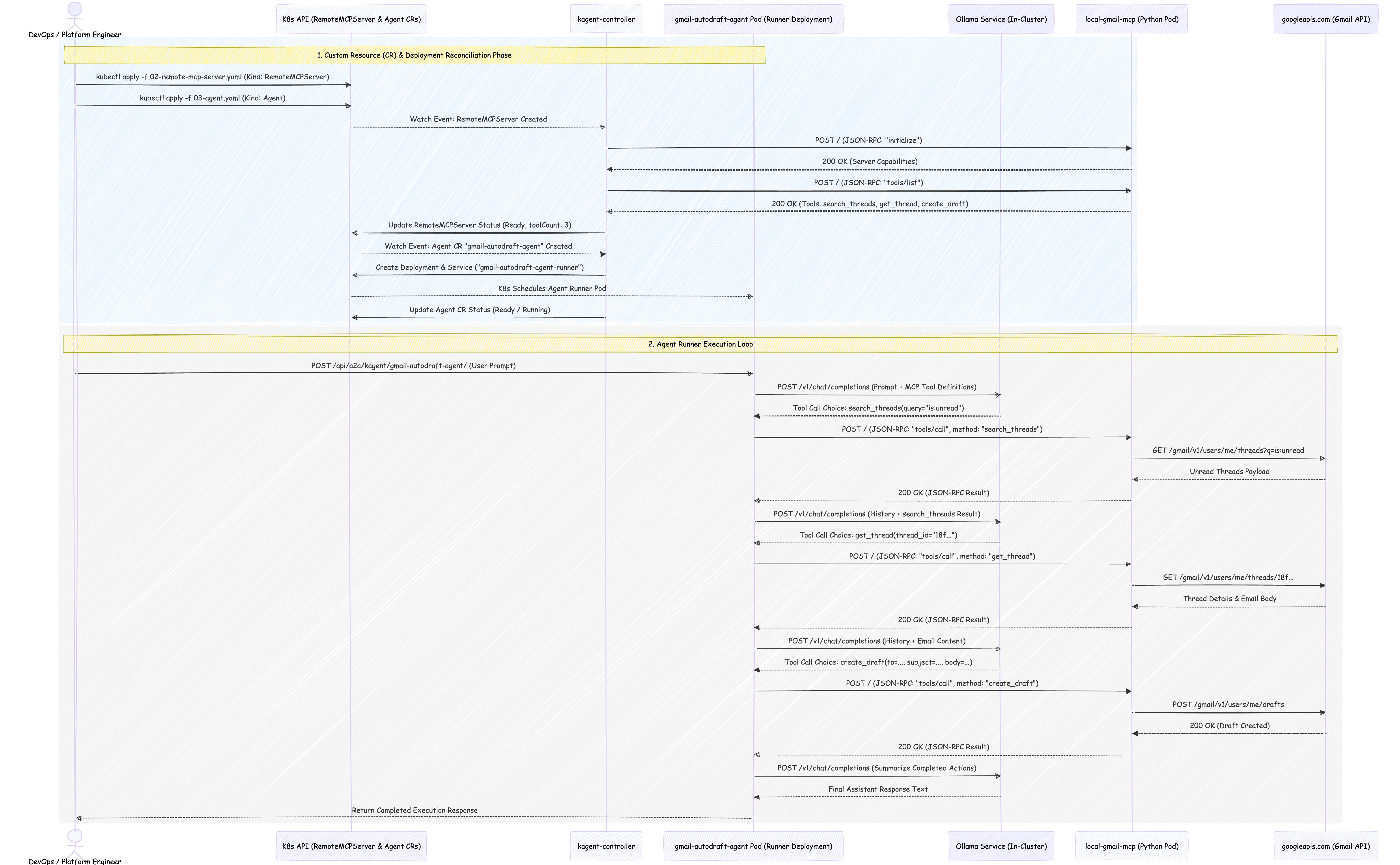
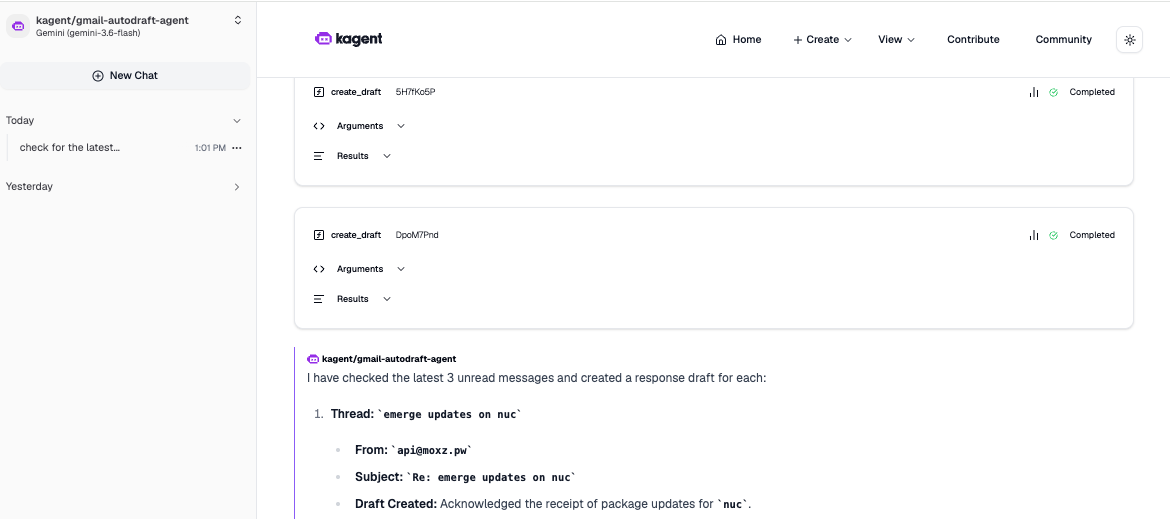
And here is how it looks like when it’s working (this is when using the official gmailmcp server or the local gmail mcp server and the gemini model or the llama3.1:8b model):
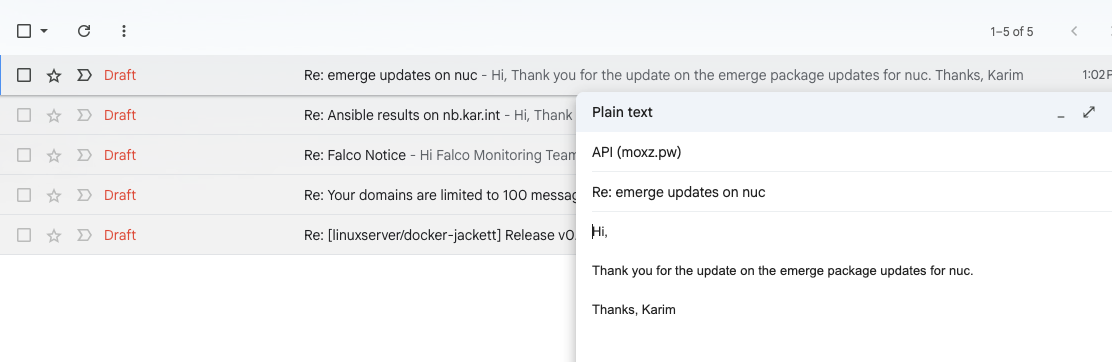
And here are the created drafts: