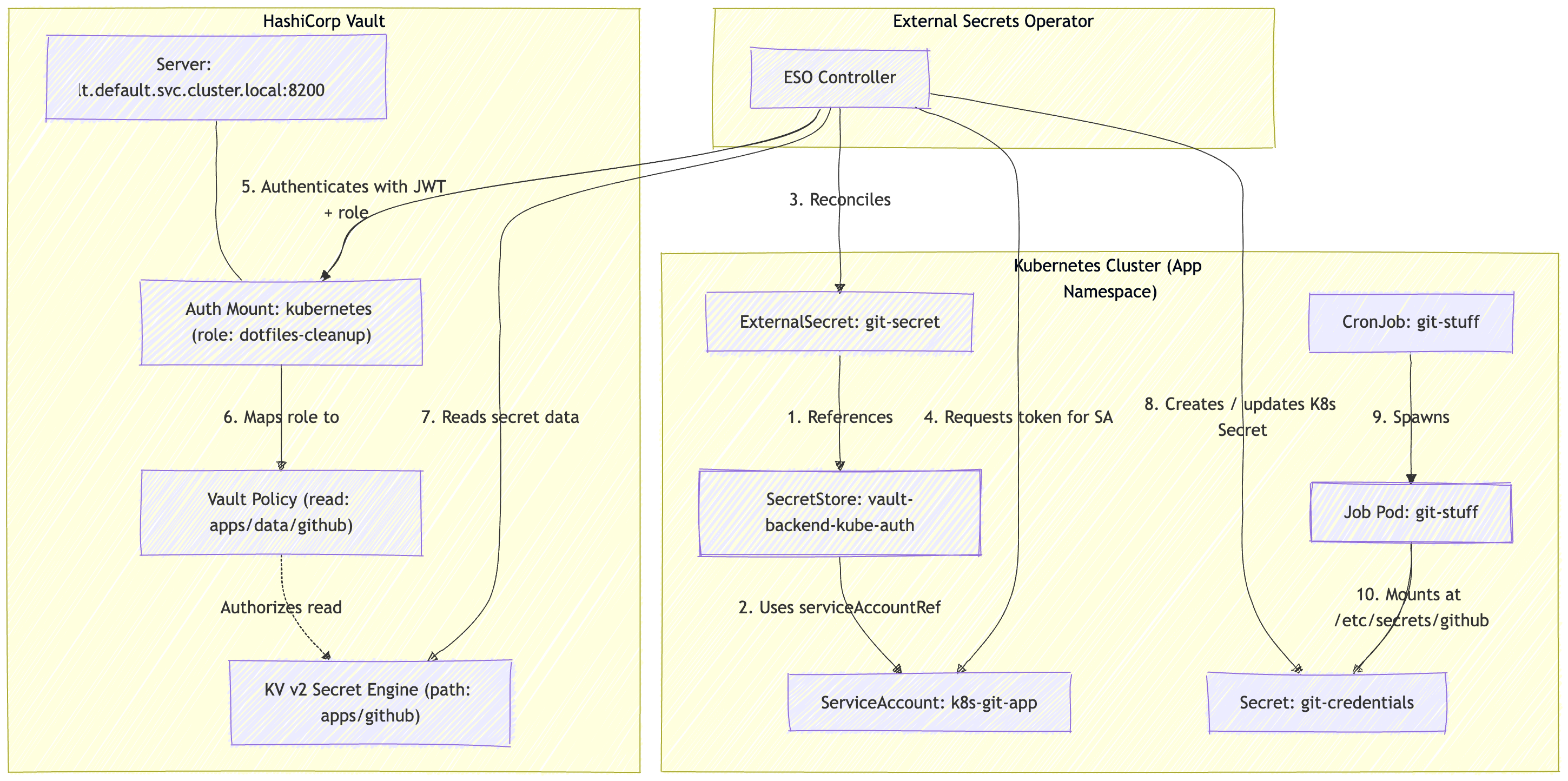
external secrets with vault and k8s
I had a k8s job that would run, check out an github repo, and perform some actions. I used to pass in a GitHub Personal Access Token with a k8s secret, but I would have to manually rotate it yearly and it was getting toilsome. After doing some research I decided to try out external secrets since I already had vault running and using a GitHub App to generate a temp token to clone the repo.
Installing External Secrets Operator
There is already a helm chart available and the install instructions cover the steps:
helm install external-secrets external-secrets/external-secrets --set crds.createClusterExternalSecret=false \
--set crds.createClusterSecretStore=false \
--set crds.createClusterPushSecret=false \
--set processClusterExternalSecret=false \
--set processClusterStore=false \
--set processClusterPushSecret=false
If all is well you should see 3 pods running:
> k get po -n eso
NAME                                                READY   STATUS    RESTARTS   AGE
external-secrets-cert-controller-57b667b95d-xtjbh   1/1     Running   0          5d12h
external-secrets-f56598b8d-x2fln                    1/1     Running   0          5d12h
external-secrets-webhook-754f6978d4-5gbf8           1/1     Running   0          5d12h
Create a Github App and Install it in the repository
Most of the instructions are covered in:
After the GitHub App is installed we need to get the following 3 values:
After getting all of the information, I used this quick bash script for testing:
#!/usr/bin/env bash
set -euo pipefail

APP_ID="YOUR_APP_ID"
INSTALLATION_ID="YOUR_INSTALLATION_ID"
PEM_PATH="path/to/your-private-key.pem"
REPO_OWNER="OWNER"
REPO_NAME="REPO"

# Helper: Base64URL encode without padding
b64url() {
  openssl base64 -e -A | tr '+/' '-_' | tr -d '='
}

# 1. Build Header and Payload
HEADER=$(printf '{"alg":"RS256","typ":"JWT"}' | b64url)

NOW=$(date +%s)
IAT=$((NOW - 60))
EXP=$((NOW + 600)) # Valid for 10 minutes

PAYLOAD=$(printf '{"iat":%d,"exp":%d,"iss":"%s"}' "$IAT" "$EXP" "$APP_ID" | b64url)

# 2. Sign Header.Payload using OpenSSL RSA-SHA256
UNSIGNED="${HEADER}.${PAYLOAD}"
SIGNATURE=$(printf '%s' "$UNSIGNED" | openssl dgst -binary -sha256 -sign "$PEM_PATH" | b64url)

JWT="${UNSIGNED}.${SIGNATURE}"

# 3. Exchange JWT for Installation Token via curl
TOKEN=$(curl -s -X POST \
  -H "Authorization: Bearer ${JWT}" \
  -H "Accept: application/vnd.github+json" \
  -H "X-GitHub-Api-Version: 2026-03-10" \
  "https://api.github.com/app/installations/${INSTALLATION_ID}/access_tokens" \
  | grep -o '"token": *"[^"]*"' | head -n 1 | cut -d'"' -f4)

if [ -z "$TOKEN" ]; then
  echo "Error: Failed to obtain installation access token." >&2
  exit 1
fi

# 4. Clone repo safely using extraHeader (keeps the token out of the clone URL)
AUTH_HEADER=$(printf "x-access-token:%s" "$TOKEN" | openssl base64 -e -A)

git -c http.extraHeader="Authorization: Basic ${AUTH_HEADER}" \
  clone "https://github.com/${REPO_OWNER}/${REPO_NAME}.git"
The base of this script came from Example: Using Bash to generate a JWT and instructions about getting an installation token is from Using an installation access token to authenticate as an app installation
Configure Vault and store secrets in Vault
First we need to enable kubernetes auth in vault, this is covered in Kubernetes auth method. It’s pretty easy:
### enable
vault auth enable kubernetes

### configure local incluster api endpoint
vault write auth/kubernetes/config \
    kubernetes_host="https://kubernetes.default.svc:443"
Create a new app and store all the values:
### create and add app_id
vault kv put apps/github app_id="xxx"

### add installation_id
vault kv patch apps/github installation_id="xxx"

### add private_key
vault kv patch apps/github private_key=@/path/to/private_key.pem
Next we need to create a policy to allow a kubernetes service account to read the vault secret:
### create a policy for external secrets svc account
vault policy write k8s-git-app - <<EOF
path "apps/data/github" {
  capabilities = ["read"]
}
EOF

### Create a role to bind to the role
vault write auth/kubernetes/role/k8s-git-app \
    bound_service_account_names=k8s-git-app \
    bound_service_account_namespaces=default \
    policies=k8s-git-app \
    ttl=1h
Configure external-secrets to get the vault secret and sync it to a kubernetes secret
I had to create 3 CRs, first the serviceaccount:
> cat serviceaccount.yaml
apiVersion: v1
kind: ServiceAccount
metadata:
  name: k8s-git-app
Then the secretStore:
> cat secretstore.yaml
apiVersion: external-secrets.io/v1
kind: SecretStore
metadata:
  name: vault-backend-kube-auth
spec:
  provider:
    vault:
      server: "http://vault.default.svc.cluster.local:8200"
      path: "apps"
      version: "v2"
      auth:
        kubernetes:
          mountPath: "kubernetes"
          role: "k8s-git-app"
          serviceAccountRef:
            name: "k8s-git-app"
And lastly the externalSecret:
> cat externalsecret.yaml
apiVersion: external-secrets.io/v1
kind: ExternalSecret
metadata:
  name: git-secret
spec:
  refreshInterval: "1h"
  secretStoreRef:
    name: vault-backend-kube-auth
    kind: SecretStore
  target:
    name: git-credentials
    creationPolicy: Owner
  dataFrom:
    - extract:
        key: github
If all is well the CRs should be healthy and the secret should be available:
> k get secretstore vault-backend-kube-auth
NAME                      AGE   STATUS   CAPABILITIES   READY
vault-backend-kube-auth   30h   Valid    ReadWrite      True

> k get externalsecret
NAME         STORETYPE     STORE                     REFRESH INTERVAL   STATUS         READY   LAST SYNC
git-secret   SecretStore   vault-backend-kube-auth   1h                 SecretSynced   True    26m

> k get secret git-credentials
NAME              TYPE     DATA   AGE
git-credentials   Opaque   2      30h
Configure the Deployment (or job) to run as a service account and mount the secrets
Just for good measure I started the job as the above service account (this is actually not required, but just in case in the future, this give me flexibility where I can update the app to directly grab the vault secrets) and mounted the secrets:
> cat cj-git-stuff.yaml
---
apiVersion: batch/v1
kind: CronJob
metadata:
  name: git-stuff
spec:
  schedule: "15 21 * * *"
  concurrencyPolicy: Forbid
  successfulJobsHistoryLimit: 2
  jobTemplate:
    spec:
      template:
        spec:
          serviceAccountName: k8s-git-app
          restartPolicy: OnFailure
          containers:
            - name: git-stuff
              image: me/it-stuff:0.0.1
              imagePullPolicy: IfNotPresent
              command: ["/usr/local/bin/git-stuff"]
              env:
              resources:
                limits:
                  cpu:    500m
                  memory: 100Mi
              volumeMounts:
                - name: github-secrets-volume
                  mountPath: /etc/secrets/github
                  readOnly: true
          volumes:
            - name: github-secrets-volume
              secret:
                secretName: git-credentials
And I had to update my application to use similar logic as the above bash script to generate a token for cloning the repo. I am surprised how well that worked out. Just for better undestanding here is how all the pieces fall together: