kagent with agent substrate
After trying out kagent with a simple MCP server, I noticed that kagent supports substrate and I wanted to try it out to see how it behaves.
Agent Substrate
I started doing research about agent substrate. It’s basically a framework for running multiple agents in an efficient manner which includes resuming and suspending the state of the agent into storage. From their site:
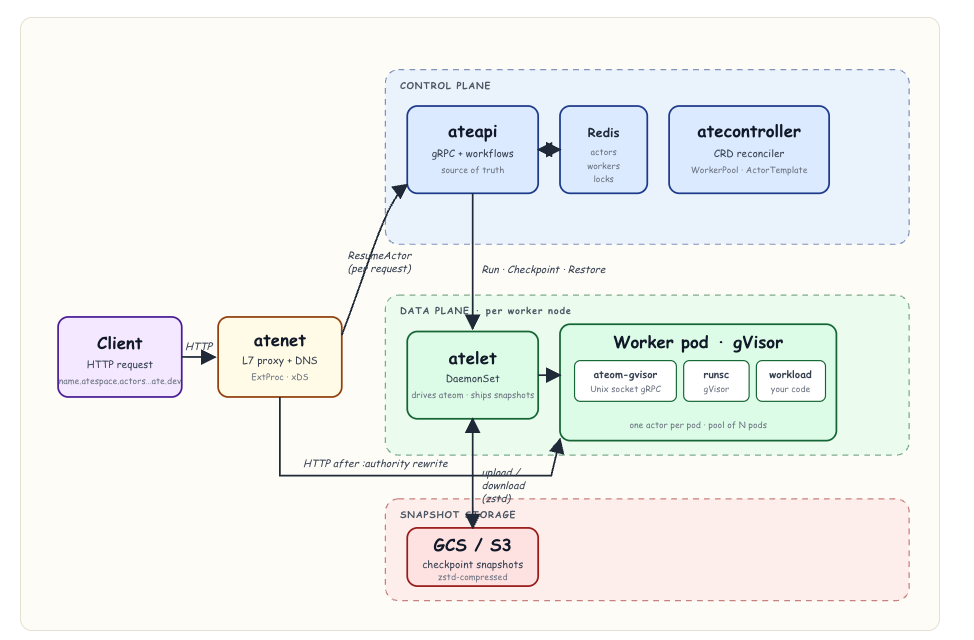
Agent Substrate delivers a performant, high density runtime environment for large scale agent deployments. The agent substrate control plane provides full lifecycle management for agent sandboxes, delivering sub-second agent resume/suspend operations, and allows heavy multiplexing of agents onto the same computer infrastructure. It supports multiple sandbox technologies including microVMs and gVisor, enabling consistent lifecycle operations for all sandbox types.
The framework is pretty involved, from Learn Agent Substrate:
Actors / ActorTemplates
With substrate there is a concept of actors:
An actor is the unit of work in Substrate. Think “an instance of an agent” - it has its own RAM state, its own filesystem, its own identity - but it’s not pinned to a pod. The same actor can suspend on worker A, resume on worker B, and pick up exactly where it left off.
And also actorTemplates:
ActorTemplate declares the shape of an actor: which container image(s), which entrypoint, which sandbox runtime, which volumes, and where snapshots go. From a single template you create many actors (instances).
When an actortemplate is created a golden Image is created:
An ActorTemplate says “this is what an actor of this kind looks like” - container image(s), entrypoint, env vars, sandbox class, and a workerSelector. By itself that’s just a manifest. (The template no longer names a worker pool: placement is selector-based, so an ActorTemplate and a WorkerPool are decoupled )
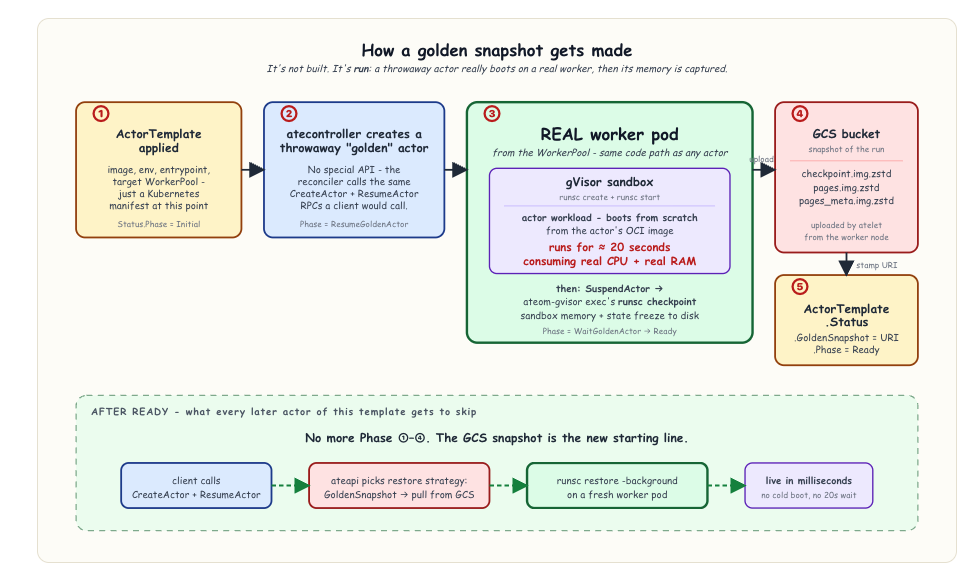
The interesting part is how Substrate produces the golden snapshot that later lets actors of this template come up in milliseconds. It does not build the snapshot statically from the image. Instead, the snapshot is recorded, not built.
atecontrollerreacts to the new template by ensuring the reserved ate-golden atespace exists (CreateAtespace), creating a throwaway “golden” actor into it (CreateActor), callingResumeActoron it, and letting the workload actually boot on a real worker pod - same sandbox (gVisor or micro-VM), same pulled OCI image, real CPU and RAM. Once the workload has had time to initialize it issues SuspendActor, which checkpoints the running sandbox. atelet uploads the resulting snapshot files to external storage (GCS/S3), and the URI prefix gets stamped back ontoActorTemplate.Status.GoldenSnapshot.So the “golden” image is a live memory snapshot of a freshly-booted workload, not a precomputed artifact. New actors get the side effects of all that initialization work - heap state, JIT caches, opened FDs, parsed config - without paying for it again.
Worker / WorkerPools
There are also workerPools:
WorkerPoolis one of Substrate’s CRDs. It says: “I want N pre-warmed worker pods of a given sandbox class, ready to host actors.” From a single pool,atecontrollermaintains a Kubernetes Deployment.
And workers:
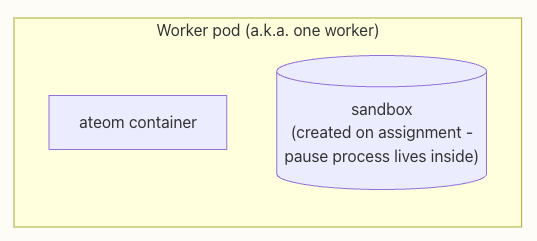
A worker is a Pod that’s pre-warmed to host actors. It’s not the actor itself - it’s the hosting slot. Worker pods come from a
WorkerPoolDeployment and are pooled, fungible, and reassigned across many actors over their lifetime.
AgentHarness
With kagent there is a concept of AgentHarness:
An AgentHarness is a Kubernetes custom resource that asks kagent to provision a long-running remote execution environment on Agent Substrate. It is useful when you want a managed sandbox that runs a coding agent (such as OpenClaw or Hermes) that you can chat with and connect to messaging channels, but you do not want kagent to package and run a full agent runtime inside the workload.
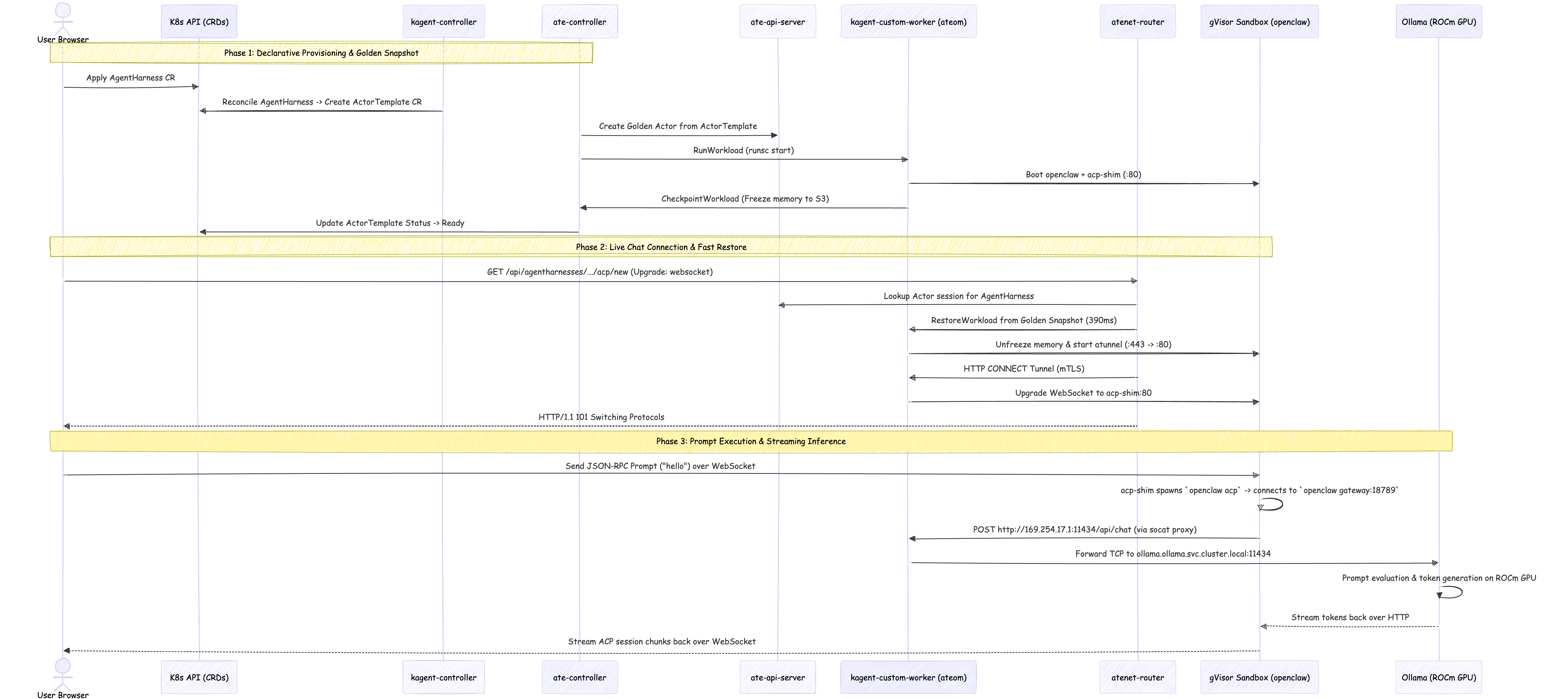
When the controller reconciles an AgentHarness, it generates a per-harness ActorTemplate and waits for its golden snapshot to become Ready. A single shared actor is then created on demand from that template on the first chat connection. Every chat is multiplexed as an ACP session inside that one long-lived actor.
Here is the overall flow:
Installing substrate
It seems the kagent and substrate component are very version specific/dependent. When I was running through this I ended up using:
substrate- version0.0.18kagent- version0.10.0-rc3
But I want to wait till the versions stabilize before calling the setup healthy.
Enabling PodCertificateRequest, ClusterTrustBundle, and ClusterTrustBundleProjection
I had to enable the PodCertificateRequest, ClusterTrustBundle, and ClusterTrustBundleProjection feature gates on my on prem kubernetes cluster. Since I use kubespray, I had to follow this process:
## Edit your cluster configuration file
inventory/mycluster/group_vars/k8s_cluster/k8s-cluster.yml

# Enable Feature Gates across all core Kubernetes components
kube_feature_gates:
  - "PodCertificateRequest=true"
  - "ClusterTrustBundle=true"
  - "ClusterTrustBundleProjection=true"

kube_kubeadm_apiserver_extra_args:
  feature-gates: "PodCertificateRequest=true,ClusterTrustBundle=true,ClusterTrustBundleProjection=true"
  runtime-config: "certificates.k8s.io/v1beta1=true,certificates.k8s.io/v1alpha1=true"

# apply it
ansible-playbook -i inventory/mycluster/hosts.yaml cluster.yml -b --tags=kube-apiserver,kube-controller-manager,kubelet
This updated the kubelet configuration, but the api-server was not updated. So I manually appied it:
sudo vi /etc/kubernetes/manifests/kube-apiserver.yaml

# Under spec.containers[0].command, append these lines
- --feature-gates=PodCertificateRequest=true,ClusterTrustBundle=true,ClusterTrustBundleProjection=true
- --runtime-config=certificates.k8s.io/v1beta1=true,certificates.k8s.io/v1alpha1=true
Confirm it’s enabled:
> kubectl api-resources | grep certificates.k8s.io
certificatesigningrequests                     csr                                 certificates.k8s.io/v1                    false        CertificateSigningRequest
clustertrustbundles                                                                certificates.k8s.io/v1beta1               false        ClusterTrustBundle
podcertificaterequests                                                             certificates.k8s.io/v1beta1               true         PodCertificateRequest
Installing with helm
From Enable AgentHarness support:
helm upgrade --install substrate-crds \
  oci://ghcr.io/kagent-dev/substrate/helm/substrate-crds \
  --version 0.0.18 \
  --namespace ate-system --create-namespace --wait

helm upgrade --install substrate \
  oci://ghcr.io/kagent-dev/substrate/helm/substrate \
  --version 0.0.18 \
  --namespace ate-system --set auth.mode=mtls --wait --timeout 10m
Update kagent to enable substrate
Here is the values.yaml I ended up using:
providers:
  default: ollama
  ollama:
    model: "gemma4:12b"
    provider: "Ollama"
    config:
      host: "http://ollama.ollama.svc.cluster.local:11434"

k8s-agent:
  enabled: false
istio-agent:
  enabled: false
kgateway-agent:
  enabled: false
observability-agent:
  enabled: false
promql-agent:
  enabled: false
argo-rollouts-agent:
  enabled: false
cilium-debug-agent:
  enabled: false
cilium-manager-agent:
  enabled: false
cilium-policy-agent:
  enabled: false
helm-agent:
  enabled: false

ui:
  enabled: true
  service:
    type: ClusterIP
    port: 8080

grafana-mcp:
  enabled: false

kmcp:
  enabled: false

querydoc:
  enabled: false

controller:
  resources:
    requests:
      cpu: 200m
      memory: 512Mi
    limits:
      cpu: "2"
      memory: 2Gi
  substrate:
    enabled: true
    ateApiEndpoint: dns:///api.ate-system.svc:443
    ateApiInsecure: true
substrateWorkerPool:
  create: false
  replicas: 0
  ateomImage: ghcr.io/kagent-dev/substrate/ateom-gvisor:v0.0.18

kagent-tools:
  enabled: false
And then I just ran this:
helm upgrade --install kagent \
  oci://ghcr.io/kagent-dev/kagent/helm/kagent \
  --version 0.10.0-rc3 -f values.yaml \
  --namespace kagent --timeout 10m --wait
Creating the agentHarness
I ended up creating the following:
apiVersion: kagent.dev/v1alpha2
kind: AgentHarness
metadata:
  name: openclaw-inbox-manager-harness
  namespace: kagent
spec:
  runtime: substrate
  backend: openclaw
  description: "Inbox drafting agent executed via OpenClaw runtime"
  substrate:
    gatewayToken: "dev-local-token"
    workerPoolRef:
      name: kagent-default
After all is well you should see the actorTemplate in a Ready state:
> kubectl describe actortemplate -n kagent openclaw-inbox-manager-harness
Name:         openclaw-inbox-manager-harness
Namespace:    kagent
Labels:       app.kubernetes.io/managed-by=kagent
              kagent.dev/agent-harness=openclaw-inbox-manager-harness
Annotations:  <none>
API Version:  ate.dev/v1alpha1
Kind:         ActorTemplate
Metadata:
  Creation Timestamp:  2026-08-22T10:06:49Z
  Generation:          1
  Owner References:
    API Version:           kagent.dev/v1alpha2
    Block Owner Deletion:  true
    Controller:            true
    Kind:                  AgentHarness
    Name:                  openclaw-inbox-manager-harness
    UID:                   4e23e7a3-36d9-4b17-9244-a0a028ef25c8
  Resource Version:        530758531
  UID:                     c00dc073-c462-42d4-a649-def902791a30
Spec:
  Containers:
    Command:
      /bin/sh
      -c
      set -e
mkdir -p "${HOME}/.openclaw"
echo 'eyJnYXRld2F5Ijp7Im1vZGUiOiJsb2NhbCIsImJpbmQiOiJsb29wYmFjayIsImF1dGgiOnsibW9kZSI6Im5vbmUifSwicG9ydCI6MTg3ODl9LCJhZ2VudHMiOnsiZGVmYXVsdHMiOnsibW9kZWwiOnsicHJpbWFyeSI6IiJ9fX0sInNlY3JldHMiOnsicHJvdmlkZXJzIjpudWxsfX0=' | base64 -d > "${HOME}/.openclaw/openclaw.json"
# Pre-warm the gateway so it lands in the golden snapshot (best effort: the
# child re-ensures it on spawn after checkpoint/restore, where the snapshotted
# Node process survives but its listener does not). The gateway stays a
# private loopback detail: kagent only ever reaches the actor through the
# shim's /acp WebSocket, never the gateway directly.
/usr/local/bin/openclaw-gateway-ensure.sh || true
# The shim owns the atenet ingress port: /acp bridges WebSocket frames to a
# long-lived `openclaw acp` child, which connects to the loopback gateway.
#
# The child is long-lived so warm reconnects (re-opening a session while the
# actor is already running) re-attach to the existing process instantly
# instead of paying a fresh Node boot + gateway handshake on every WebSocket
# connection. The child is started lazily on the first connection and only
# respawned after it exits (e.g. when its loopback gateway link dies across a
# checkpoint/restore); each fresh spawn re-runs openclaw-gateway-ensure.sh, so
# the gateway is re-established before `openclaw acp` reconnects.
#
# The child must NOT pass --url: `openclaw acp` only applies the gateway
# token from gateway.remote.token when it also resolves the URL from
# gateway.remote.url (both are written to openclaw.json above). An explicit
# --url bypasses the config token and fails against a token-auth gateway.
exec /usr/local/bin/acp-shim \
  --listen :80 \
  -- /bin/sh -c '/usr/local/bin/openclaw-gateway-ensure.sh && exec openclaw acp'
    Env:
      Name:       HOME
      Value:      /home/agent
      Name:       OPENCLAW_GATEWAY_PORT
      Value:      18789
    Image:        ghcr.io/kagent-dev/kagent/acp-sandbox-openclaw@sha256:47996e955a798850e5303ff490fe8b42e98532b64f9160f97098eb5bbe13bd84
    Name:         openclaw
  Pause Image:    gcr.io/gke-release/pause@sha256:bcbd57ba5653580ec647b16d8163cdd1112df3609129b01f912a8032e48265da
  Sandbox Class:  gvisor
  Snapshots Config:
    Location:   gs://ate-snapshots/kagent/openclaw-inbox-manager-harness
    On Commit:  Full
    On Pause:   Full
  Worker Selector:
    Match Labels:
      kagent.dev/worker-pool:  kagent-default
Status:
  Conditions:
    Last Transition Time:   2026-08-22T10:08:28Z
    Message:                Actor template is ready for use
    Reason:                 Ready
    Status:                 True
    Type:                   Ready
  Golden Actor Id:          c00dc073-c462-42d4-a649-def902791a30
  Golden Snapshot:          c51e9b31-642a-42eb-9b78-d423780ea4aa
  Phase:                    Ready
  Take Golden Snapshot At:  2026-08-22T10:08:24Z
Events:                     <none>
And the agentHarness also ready:
> k describe agentharness -n kagent openclaw-inbox-manager-harness
Name:         openclaw-inbox-manager-harness
Namespace:    kagent
Labels:       <none>
Annotations:  argocd.argoproj.io/tracking-id: kagent-home:kagent.dev/AgentHarness:kagent/openclaw-inbox-manager-harness
API Version:  kagent.dev/v1alpha2
Kind:         AgentHarness
Metadata:
  Creation Timestamp:  2026-08-21T15:30:32Z
  Finalizers:
    kagent.dev/agent-harness-backend-cleanup
  Generation:        3
  Resource Version:  530758534
  UID:               4e23e7a3-36d9-4b17-9244-a0a028ef25c8
Spec:
  Backend:      openclaw
  Description:  Inbox drafting agent executed via OpenClaw runtime
  Runtime:      substrate
  Substrate:
    Gateway Token:  dev-local-token
    Worker Pool Ref:
      Name:  kagent-default
Status:
  Conditions:
    Last Transition Time:  2026-08-21T20:46:48Z
    Message:               ActorTemplate golden snapshot is ready
    Observed Generation:   3
    Reason:                AgentHarnessAccepted
    Status:                True
    Type:                  Accepted
    Last Transition Time:  2026-08-22T10:08:28Z
    Message:               AgentHarness template is ready; one shared actor serves all chat sessions
    Observed Generation:   3
    Reason:                TemplateReady
    Status:                True
    Type:                  Ready
    Last Transition Time:  2026-08-22T10:08:28Z
    Message:               ActorTemplate golden snapshot is ready
    Observed Generation:   3
    Reason:                Ready
    Status:                True
    Type:                  ActorTemplateReady
    Last Transition Time:  2026-08-22T10:08:28Z
    Message:               shared actor is created on demand on the first chat connect
    Observed Generation:   3
    Reason:                TemplateReady
    Status:                True
    Type:                  ActorReady
  Observed Generation:     3
Events:                    <none>
If you want more documentation on substrate check out the following resources:
- Agent Sandbox on GKE is now available for everyone, and a first look at Agent Substrate
- Agent Substrate OSS Launch Demo
- Live Actor Migration in Agent Substrate: Moving State Across Workers
fixing random issues
After deploying both substrate and kagent, I had to fix a bunch of issues:
| # | Issue Observed | Root Cause | Resolution |
|---|---|---|---|
| 1 | openclaw gateway crash (secrets.providers: Invalid input) |
kagent-controller synthesized secretKeyRef env references from modelConfigRef, outputting secrets.providers: null in openclaw.json. |
Commented out modelConfigRef in AgentHarness and generated clean config. |
| 2 | Sandbox DNS resolution failure (EAI_AGAIN) |
ate-api-server had --egress-gateway-address=atenet-egress... pointing to a nonexistent egress service. |
Patched ate-api-server args with --egress-gateway-address="" in Kustomize. |
| 3 | Sandbox egress timeout to ollama.ollama.svc (10.233.16.172) |
gVisor sandbox network (169.254.17.2) is isolated from direct Kubernetes ClusterIP routing, but has a direct point-to-point link with the worker host at 169.254.17.1. |
Added a lightweight ollama-proxy (socat) sidecar container to the worker pod listening on 169.254.17.1:11434. |
| 4 | No API key found for provider "ollama" |
OpenClaw required a static credential for provider authentication in openclaw.json & auth-profiles.json. |
Added "apiKey": "ollama-local" and populated /home/agent/.openclaw/agents/main/agent/auth-profiles.json. |
| 5 | LLM responses cut off mid-sentence (timeoutMs: 120000) |
OpenClaw defaulted to a 120s HTTP fetch timeout. Evaluating large prompt payloads with tool schemas exceeded 2 minutes. | Added "timeoutSeconds": 600 (10 min) to models.providers.ollama. |
And here were some common commands I used for troubleshooting:
-
Find Active Actor UID from Database
ACTOR_UID=$(kubectl exec -n ate-system postgres-0 -- psql -U postgres -d atepg -t -A -c "SELECT uid FROM actors WHERE atespace = 'kagent' LIMIT 1;") echo "Actor UID: ${ACTOR_UID}" -
Configure OpenClaw Inside the gVisor Sandbox
kubectl exec -n kagent deployment/kagent-custom-worker -c ateom -- \ /var/lib/ateom-gvisor/static-files/gvisor-9e7a5fcc2cbd28c9cd4af910a9327abcf07a8efcce242c285b860d79010c2db5/runsc \ --root /var/lib/ateom-gvisor/actors/${ACTOR_UID}/runsc-state \ exec openclaw /bin/sh -c ' # 1. Create auth profile store mkdir -p /home/agent/.openclaw/agents/main/agent echo "{\"profiles\":{\"ollama:default\":{\"type\":\"api_key\",\"provider\":\"ollama\",\"key\":\"ollama-local\"}},\"order\":{\"ollama\":[\"ollama:default\"]}}" > /home/agent/.openclaw/agents/main/agent/auth-profiles.json # 2. Write openclaw.json with 169.254.17.1 proxy & 600s timeout echo "eyJnYXRld2F5Ijp7InBvcnQiOjE4Nzg5LCJiaW5kIjoibG9vcGJhY2siLCJhdXRoIjp7Im1vZGUiOiJub25lIn19LCJtb2RlbHMiOnsibW9kZSI6Im1lcmdlIiwicHJvdmlkZXJzIjp7Im9sbGFtYSI6eyJiYXNlVXJsIjoiaHR0cDovLzE2OS4yNTQuMTcuMToxMTQzNCIsImFwaSI6Im9sbGFtYSIsImFwaUtleSI6Im9sbGFtYS1sb2NhbCIsInRpbWVvdXRTZWNvbmRzIjo2MDAsIm1vZGVscyI6W3siaWQiOiJxd2VuMi41OjMyYiIsIm5hbWUiOiJxd2VuMi41OjMyYiJ9XX19fSwiYWdlbnRzIjp7ImRlZmF1bHRzIjp7Im1vZGVsIjp7InByaW1hcnkiOiJvbGxhbWEvcXdlbjIuNTozMmIifX19fQo=" | base64 -d > /home/agent/.openclaw/openclaw.json # 3. Restart openclaw gateway kill -9 $(pidof node) 2>/dev/null || true /usr/local/bin/openclaw-gateway-ensure.sh ' -
Ensure acp-shim is Listening on :80
kubectl exec -n kagent deployment/kagent-custom-worker -c ateom -- \ /var/lib/ateom-gvisor/static-files/gvisor-9e7a5fcc2cbd28c9cd4af910a9327abcf07a8efcce242c285b860d79010c2db5/runsc \ --root /var/lib/ateom-gvisor/actors/${ACTOR_UID}/runsc-state \ exec openclaw /bin/sh -c 'nohup /usr/local/bin/acp-shim --listen :80 -- /bin/sh -c "/usr/local/bin/openclaw-gateway-ensure.sh && exec openclaw acp" > /tmp/acp-shim.log 2>&1 &' -
Verify Sandbox-to-Ollama Connectivity:
kubectl exec -n kagent deployment/kagent-custom-worker -c ateom -- \ /var/lib/ateom-gvisor/static-files/gvisor-9e7a5fcc2cbd28c9cd4af910a9327abcf07a8efcce242c285b860d79010c2db5/runsc \ --root /var/lib/ateom-gvisor/actors/${ACTOR_UID}/runsc-state \ exec openclaw curl -s http://169.254.17.1:11434/api/tags -
Monitor Live Token Streaming from GPU
kubectl logs -n ollama deployment/ollama --tail=20 -f -
Monitor OpenClaw Activity & Timings:
 kubectl exec -n kagent deployment/kagent-custom-worker -c ateom -- \
   /var/lib/ateom-gvisor/static-files/gvisor-9e7a5fcc2cbd28c9cd4af910a9327abcf07a8efcce242c285b860d79010c2db5/runsc \
   --root /var/lib/ateom-gvisor/actors/${ACTOR_UID}/runsc-state \
   exec openclaw tail -n 25 -f /tmp/openclaw/openclaw-2026-08-22.log
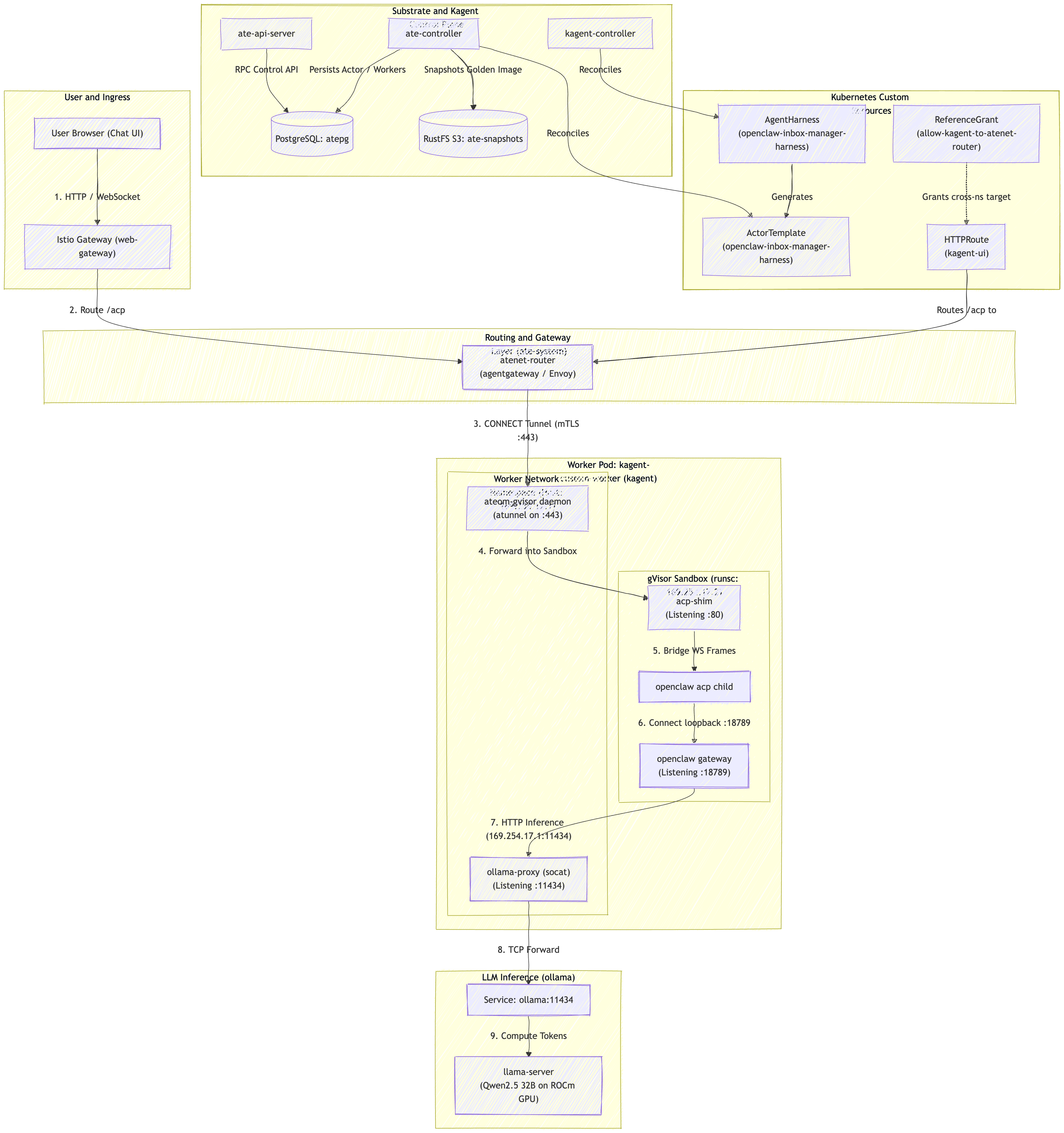
Here is another diagram of how things fit together:
Final Setup
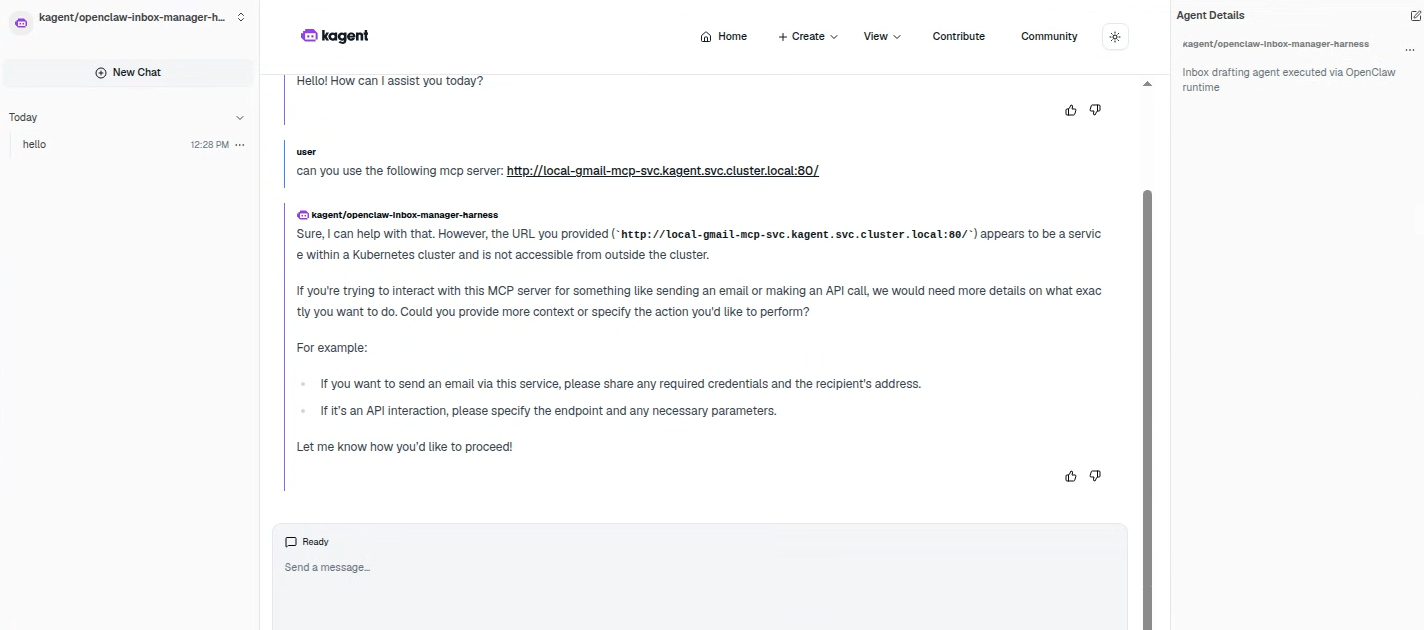
After all of that was configured I was able to visit the UI, select the agentHarness and have a conversation with the agent: